E-Prescription Software with Voice Input
Speak the Rx — in Your Own Language
Dictate prescriptions and clinical notes in all 22 major Indian languages plus English and Hinglish. AI converts your voice to structured digital records.
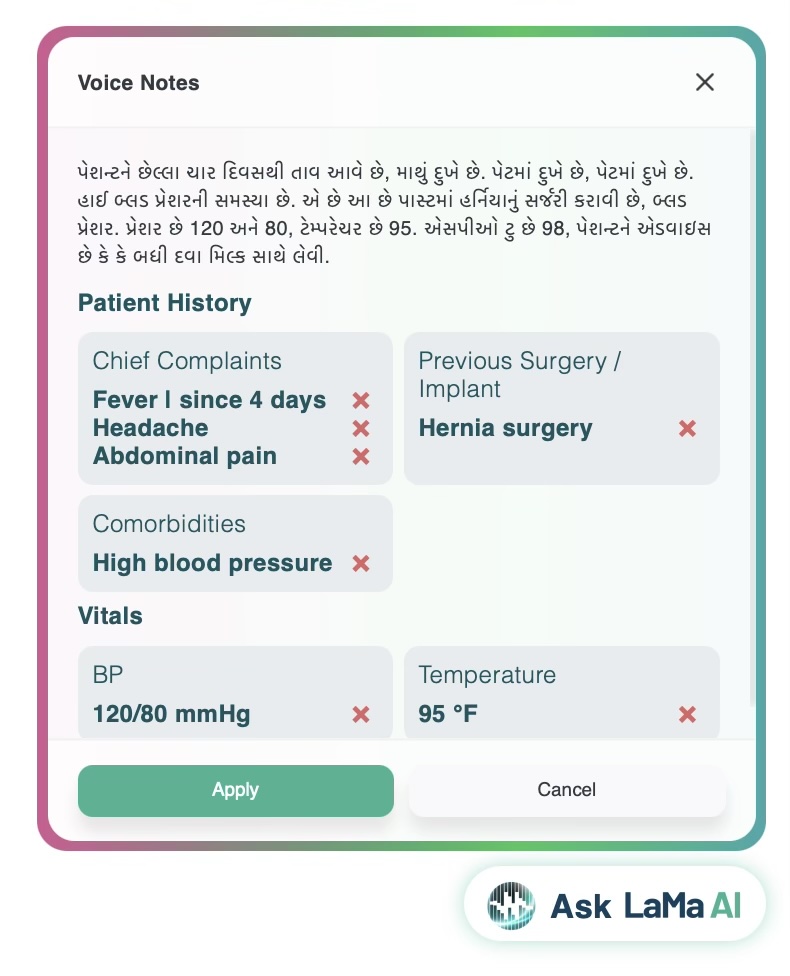
Lifemaan's Speech-to-Rx lets Indian doctors dictate prescriptions in any of the 22 major Indian languages — Hindi, Gujarati, Marathi, Tamil, Telugu, Bengali, Kannada, Malayalam, Punjabi, Urdu, Odia, Assamese, and the other scheduled languages — plus English and Hinglish (mixed). The AI converts speech into structured digital prescriptions. It coexists with tablet handwriting and computer-based typing on the same prescription screen. Used by 576+ hospitals across India.
Last updated: May 2026
Why Do Indian Doctors Choose Speech-to-Rx?
Faster than typing for long Rx
Speak at natural speed. AI handles the rest.
22 Indian languages + English + Hinglish
All 22 scheduled Indian languages understood, plus mixed-language Hinglish.
Coexists with tablet and typing
Switch input methods mid-prescription — dictate, then sign on tablet, or type a tricky drug name.
See Speech-to-Rx in Action
A doctor dictates a note in mixed Hindi–Gujarati–English — the AI fills the vitals and diagnosis live.
Tap to play with sound — the voice is the proof.
How Does AI Voice Prescription Writing Work?
Speak Naturally
Dictate your prescription in any of the 22 major Indian languages, in English, or in Hinglish. The AI listens and transcribes.
AI Structures It
Voice converted to structured prescription with medicine names, dosages, and instructions.
Review & Send
Quick review, sign on tablet if needed. Send via WhatsApp or print.
What Are the Key Speech-to-Rx Features?
Multi-Language AI
Understands all 22 major Indian languages, English, and mixed-language Hinglish dictation.
Medical Vocabulary
Trained on medical terms, Indian drug and brand names, and clinical phrases.
Editable Output
Review and edit the transcribed prescription before saving.
Works With Tablet + Typing
Combine dictation with tablet signing or keyboard typing on the same prescription.
Who Benefits from Voice Prescription Software?
Frequently Asked Questions
What Does Speech-to-Rx Replace, and When Does Each Input Win?
Speech-to-Rx is one of three input methods on the same Lifemaan prescription screen. Rather than locking the doctor into one style, it replaces the slowest part of digital prescribing — typing a long medicine list — while tablet writing and typing stay available for what each does best.
| Prescription task | Replaces | Best input in Lifemaan |
|---|---|---|
| Long medicine list | Slow typing into a template | Speech-to-Rx dictation in 22 languages + English |
| Mixed-language instructions | Switching keyboards mid-line | Speech-to-Rx dictation in Patient Language |
| Anatomical marking / diagram | Stapling a paper scan | Tablet handwriting with a stylus |
| One tricky drug name | Re-dictating until correct | Keyboard typing with template select |
| Doctor signature | A separate paper sign-off | Tablet stylus signature |
Speech-to-Rx is one example of how Lifemaan applies AI in hospital management. To try voice prescribing on your own consultations, book a free demo.
What Is E-Prescription Software, and What Should It Do in India?
E-prescription software replaces the handwritten prescription pad with a digital record: the doctor issues the prescription electronically, it is stored against the patient's file, and it reaches the patient and the pharmacy without a paper slip being the only copy. A prescription management system is the same idea seen from the hospital's side — every prescription issued across every consultant, searchable and reportable rather than scattered across counterfoils.
Where most e-prescription tools fall down in India is not the storage — it is the input. A system that requires the doctor to type is asking a consultant seeing sixty patients in a morning to change the one habit they are least willing to change, and the usual result is that the doctor keeps writing on paper while a junior enters it later, which gives the hospital a digital record that is a day old and second-hand. That is the specific problem Lifemaan is built around: the record has to be created by the doctor, at the moment of the consultation, without the doctor adopting a keyboard.
So the questions worth asking any e-prescription vendor in India are narrower than a feature list: How does the doctor actually enter the prescription, and does it require typing? Does the prescription reach the patient without them installing an app? Is the output a structured record you can search and report on, or an image? Does it link to the patient's ABHA? Lifemaan answers those with three coexisting input methods, WhatsApp delivery, field-level structured records, and ABDM compliance certified by the National Health Authority across Milestones M1, M2 and M3.
Which Languages Can You Dictate the Prescription In?
Speech-to-Rx accepts dictation in all 22 languages listed in the Eighth Schedule of the Indian Constitution, plus English, plus Hinglish — the mixed register most Indian doctors actually speak in the consulting room. This matters more than a feature list suggests: a physician in Rajkot explaining a dose to an elderly patient is not speaking textbook Gujarati or textbook English, and software that only accepts one or the other forces them back to the keyboard.
What Hinglish dictation actually sounds like
“Tab Augmentin 625 — ek subah, ek raat, paanch din. Syrup Zincovit, do chammach din mein ek baar. Khaana ke baad lena hai. Agar bukhar teen din se zyada rahe to wapas dikhana.”
The drug names, strengths and duration come out in English because that is how the doctor says them; the instructions come out in Hindi because that is how the patient needs them. Speech-to-Rx does not require the doctor to pick a language before starting, and does not need them to switch keyboards mid-line. The structured record it produces holds the medicine, strength, frequency and duration as separate fields regardless of which language each part arrived in — so the record is searchable and can flow through ABDM later, while the patient still receives the instruction in the language they read.
Handwriting on the tablet is language-agnostic in a different way — the stylus captures whatever script the doctor writes, including regional scripts, because it is capturing strokes rather than interpreting words. Doctors who prefer the keyboard get template selection instead. All three sit on the same prescription screen.
What Happens to the Prescription After You Speak It?
Dictation is only useful if what comes out the other end is a real record rather than a block of transcribed text. Here is the path from the doctor's voice to the patient's phone.
It becomes a structured digital record, not a transcript
The medicine, strength, frequency, duration and instruction are held as separate fields against that visit. That is what makes the record searchable later — you can find every patient put on a particular drug, or see what this patient was prescribed eighteen months ago, because the data is in fields rather than buried in a paragraph.
It goes to the patient on WhatsApp
One tap sends the prescription to the phone number reception captured at registration. The patient installs nothing and signs into nothing. If they walk to a pharmacy with none of your systems, they show the message. If they want a second opinion, they forward it.
The pharmacy can dispense against it
In a hospital running the Lifemaan pharmacy, the prescription is visible to the counter, and what is dispensed is billed against the patient rather than leaving the store untracked. Read more about how the pharmacy module handles this on the pharmacy management page.
It is stored against the patient's history
The next time the patient is registered — three weeks or three years later — the doctor opens them and sees this prescription in context with everything before it. This is the part that makes a follow-up consultation short: the doctor is not reconstructing what was tried already.
It can be linked to the patient's ABHA
Lifemaan is ABDM compliant, certified by the National Health Authority across Milestones M1, M2 and M3, so with the patient's consent the record links to their ABHA and can be shared with other providers.
What If It Mishears a Drug Name?
This is the first question every careful doctor asks, and it deserves a straight answer rather than a claim about accuracy percentages. Voice recognition is not perfect, and in medicine the cost of a wrong drug name is not a typo — so the design assumption is that the doctor confirms before anything is saved, not that the AI is always right.
Nothing is saved until you confirm it
The transcription appears on screen as an editable draft. It becomes part of the patient record only when the doctor saves it. There is no path where a dictated prescription reaches a patient without the doctor having seen the text — the review step is not optional and cannot be configured away.
Drug names are matched against a medicine list
Rather than transcribing a drug name phonetically and leaving it, the system matches what it heard against known Indian drug and brand names. This is why it handles names that generic dictation tools mangle. Where a spoken name is genuinely ambiguous between two similar products, the doctor picks — the software does not guess silently.
Correcting one item does not mean re-dictating everything
If one line in a six-medicine prescription came out wrong, the doctor edits that line. Most doctors settle into a hybrid within a week: dictate the list, then fix the one stubborn drug name with the keyboard, because typing eight characters is faster than repeating a sentence. That is a normal way to use it, not a workaround.
A noisy OPD is the real test
A consulting room with a fan running, a family talking and a queue outside the door is the actual environment, not a quiet office. Dictation works in that setting because it picks up the speaker close to the microphone, and because the doctor speaks toward the device rather than across the room. If your OPD is unusually loud, this is worth testing during the demo on your own premises rather than taking anyone's word for it — ask for that specifically.