
Discharge Summary Software for Indian Hospitals
Book a 15-minute demo — see a discharge summary generated in under 5 minutes.
Lifemaan's discharge summary module generates professional discharge summaries digitally — auto-filled from patient records, customizable templates, and tablet handwriting support. Discharge summaries are ABDM-linked, so they can be shared with the patient's ABHA on their consent — Lifemaan is ABDM compliant, certified by the National Health Authority across Milestones M1, M2 and M3. Part of the complete hospital management system, used by 576+ hospitals across India.
Last updated: June 2026
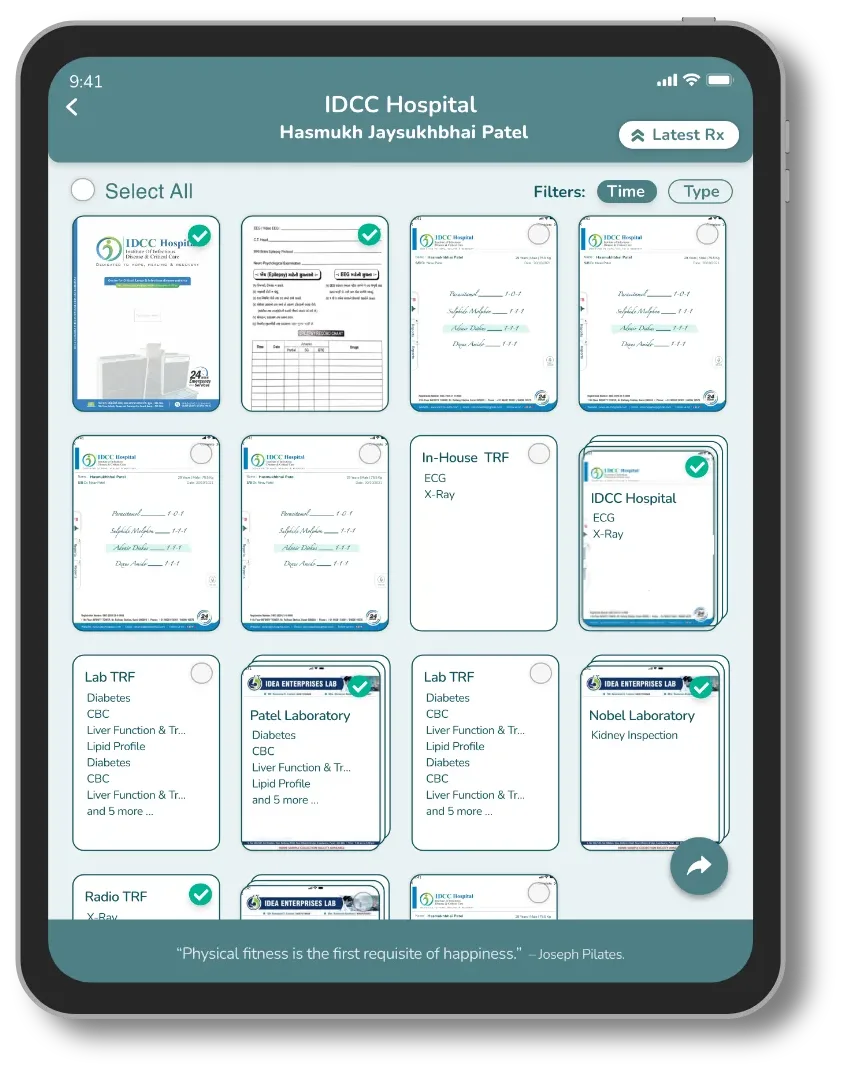
What is Discharge Summary Software?
Discharge summary software is a digital tool that helps hospital doctors generate, manage, and share patient discharge summaries efficiently. A discharge summary is a critical clinical document prepared when a patient is discharged from the hospital — it summarizes the patient's diagnosis, treatment, medications, and follow-up instructions.
In most Indian hospitals, discharge summaries are still written manually. A doctor or junior resident spends 15–30 minutes per patient copying information from different sources — case sheets, lab reports, medication charts — onto a printed form or typed document. This process is error-prone, time-consuming, and delays the actual discharge.
Digital discharge summary software solves this by auto-filling patient data from the hospital's management system, providing structured templates, and allowing doctors to add notes via tablet or keyboard — reducing discharge summary creation time from 30 minutes to under 5 minutes. It is one of the core modules of a modern hospital system — see the HMS modules explained for how it fits with IPD, billing, and pharmacy.
How Lifemaan Generates Discharge Summaries
Lifemaan's discharge summary module is built into the IPD (inpatient department) workflow. Here is how it works:
Auto-pulls data from patient record
When you open the discharge summary for a patient, Lifemaan automatically fills in the diagnosis, medications administered, procedures performed, doctor's name, admission date, and lab results from the IPD record.
Template-based with customization
Select from pre-configured discharge summary templates suited to your department. Edit any section — add clinical notes, modify instructions, or include additional information.
Tablet handwriting for personal notes
Use the tablet stylus to add handwritten notes or annotations directly on the summary — ideal for doctors who prefer to add clinical observations in their own style.
Print or send digitally
Finalize and print the discharge summary, or send it directly to the patient via WhatsApp. Patients receive a clean, professional document they can easily share.
Discharge Summaries as Part of the Complete Hospital System
Discharge summary software is most valuable when it is integrated with the rest of the hospital management system — not a standalone tool. Lifemaan connects discharge summaries directly to:
- IPD Management — All IPD data flows directly into the discharge summary.
- Patient Records — Discharge summary automatically archived in the patient's complete medical history.
- Billing — Discharge triggers auto-generation of the final bill.
- Hospital Management System — Part of the complete, integrated Lifemaan HMS.
Trusted by doctors and hospitals across India
“This is the best app for busy doctors like me. Writing on Tablet is so effortless, I am 100% satisfied with Lifemaan's platform.”
Dr. Nirav Satasiya
MS (General Surgery), Satasiya Surgical Hospital, Junagadh
“I tried other typing-based software and after 3-4 days I dropped it. Since I started using Lifemaan, writing on Tablet is same as writing on Paper. I have no reason to go back to paper system.”

Dr. Bhavinkant Chaudhari
MD Physician (Internal Medicine), Bardoli, Surat
“My patients love getting prescriptions on WhatsApp. It's professional, instant, and they don't lose it.”

Dr. Nirav Gondaliya
MD Physician, IDCC Hospital, Surat
Discharge Summary: Digital vs Manual
| Feature | LLifemaan Digital | Manual / Paper |
|---|---|---|
| Time to generate | 2–5 minutes | 15–30 minutes |
| Auto-fill from patient record | Yes | No — manual copy |
| Customizable templates | Yes | Fixed format |
| Tablet handwriting support | Yes | N/A |
| Searchable / retrievable | Yes | No |
| Send digitally (WhatsApp/email) | Yes | No |
| Errors from manual copying | Eliminated | Common |
Time to generate
2–5 minutes
15–30 minutes
Auto-fill from patient record
Yes
No — manual copy
Customizable templates
Yes
Fixed format
Tablet handwriting support
Yes
N/A
Searchable / retrievable
Yes
No
Send digitally (WhatsApp/email)
Yes
No
Errors from manual copying
Eliminated
Common
Frequently Asked Questions
See Lifemaan in Action
15-minute personalized walkthrough. We show you exactly how it works for your practice.
Or reach us directly: +91 90237 53539 · WhatsApp