Multi-Speciality Hospital Management Software
Run every speciality on one platform — general medicine, pediatrics, gynaecology, dental, cardiology, ortho, ENT, dermatology, ophthalmology, surgery, and more. Cross-specialty referrals, one EMR per patient, and cross-department billing on a single invoice. Trusted by 576+ hospitals.
Lifemaan is hospital management software built for multi-speciality hospitals. Every specialty — general medicine, pediatrics, gynaecology, dental, cardiology, orthopedics, ENT, dermatology, ophthalmology, surgery, and more — runs on the same patient EMR, with cross-department billing on a single invoice, ABDM-linked records, and documentation patterns aligned with NABH chapter requirements. Used across 576+ hospitals in India.
Last updated: May 2026
The challenge multi-speciality hospitals face
Multi-speciality hospitals are defined by the patterns that cross specialty boundaries: the same patient consulting general medicine, getting referred to cardiology, having a procedure under anaesthesia, recovering in ICU, and discharging from the cardiology IPD ward should have one longitudinal record across all of it. The bill at the end should be one bill. The discharge summary should pull from notes written by every consultant who saw the patient. The ABDM consent flow should operate on one record per patient.
What this page covers
Lifemaan organises each specialty's consultation records inside that specialty's view, while the patient's broader medical record stays available for any consultant who needs to look it up. The billing module sees every consultant's contribution against the patient profile, and the reporting layer attributes revenue to the right department and consultant.
- 1Specialty-specific workflows
- 2Cross-department referrals
- 3NABH-aligned documentation
- 4ABDM linkage
- 5Multi-doctor IPD coordination
- 6Multi-branch deployment for hospital groups
Why Lifemaan for Multi-Speciality Hospitals?
Built for the complexity of running multiple specialties under one roof — without forcing each specialty into someone else's workflow.
Every Specialty on One EMR
General medicine, pediatrics, gynaecology, dental, cardiology, ortho, ENT, dermatology, ophthalmology, surgery — all sharing one patient record.
Tablet Writing for Every Consultant
Every doctor writes on a tablet — same handwriting as paper, across every speciality.
Role-Based Access
Admins, doctors, nurses, billing, and pharmacy each see only what they need — across departments.
The Complexity Multi-Speciality Hospitals Face
Every specialty has its own workflow, its own terminology, its own prescription patterns, its own investigations, and its own billing structure. A cardiology consultation looks nothing like a pediatric consultation. A C-section bill structures differently from an orthopedic implant surgery. ICU charting for a post-cardiac patient differs from ICU charting for a post-trauma case.
At the same time, the patient's record has to live in one hospital. A patient who comes in through general medicine, gets referred to cardiology, has a procedure in OT, recovers in ICU, and discharges from the cardiology IPD ward needs their medical record stored once against their patient profile so that any consultant seeing them later has access to that history. The TPA claim should reference one patient ID. The discharge summary should pull from notes written by consultants in the specialty handling the admission.
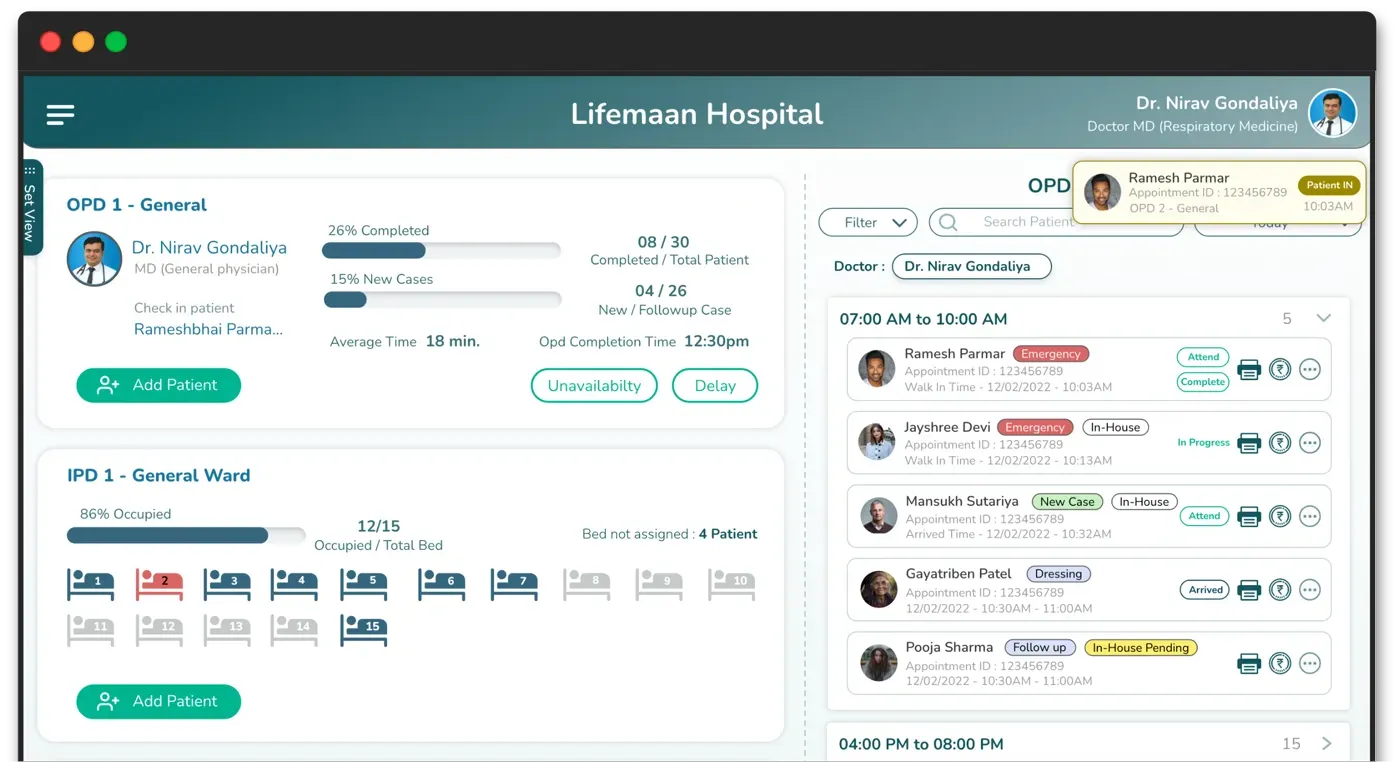
Lifemaan handles both sides. Each specialty gets the workflow it needs — its OPD queue, its prescription input method, its specialty-specific data fields — and works inside its own consultation view rather than scrolling through every other specialty's entries. The patient's broader medical record sits against the patient profile and can be opened by any authorised consultant who needs the cross-specialty context. The billing module sees the charges captured against the patient profile across every department they have been through.
The Make-or-Break Variable: Consultant Adoption Across Specialties
Multi-speciality hospitals onboarding to a new platform face the consultant-adoption challenge multiplied across specialties. Different specialty consultants have different consultation patterns, different prescription formats, different terminology, and different tolerance levels for workflow changes. Lifemaan's tablet writing and Speech-to-Rx absorb this variance because they do not impose a single workflow on the consultants — each consultant continues to consult the way they always have, with the digital record produced as a side-effect of the consultation. The cross-specialty operational benefits — shared patient file, cross-department billing, consolidated reporting — accrue without any consultant having to give up their preferred consultation pattern.
Specialty Coverage in Lifemaan
Lifemaan supports all major specialties out of the box, including:
Some specialty landing pages on lifemaan.com are still being built — the underlying product supports the workflows today. For dedicated specialty pages already live, see dental, pediatrician, gynecologist, physician, surgeon, and orthopaedic.
How Each Specialty Uses Lifemaan Differently
General medicine and physician practice
High-volume OPD with the standard mix of acute illness, chronic disease management, and pre-admission workups that route into IPD. The medicine consultant uses tablet writing for the bulk of prescriptions, Speech-to-Rx for long multi-drug regimens, and the IPD module for admissions. Cross-referrals to cardiology, endocrinology, nephrology, and surgery are routed against the patient profile so the receiving consultant can review the relevant past records.
Pediatrics
IAP-aligned immunization scheduling with WhatsApp parent reminders. WHO and IAP growth charts on the tablet during consultations. Pediatric dose-by-weight calculation built into the prescription module. Anthropometry and developmental milestones as structured fields. Antenatal-to-newborn handoff with the gynaecology team through the same patient file. See the pediatrician page for the full pediatric workflow.
Gynaecology
LMP-based EDD auto-calculation. ANC tracking trimester-by-trimester with structured visit fields. Side-by-side ultrasound comparison across visits. PCOS and infertility workup tracking. ANC, delivery, and IVF packages as billing items. PCPNDT-pattern sonography records. See the gynecologist page.
Dental
Dental chart on the tablet with the affected teeth marked using the stylus, alongside the medication list and recall instructions on the same prescription page. Procedure-package billing — root canal package, crown package, ortho retention package — rather than per-visit charges.
Cardiology and orthopedics
Specialty-specific OPD workflow, with IPD and ICU for admissions; OT integration for orthopedic surgeries and cardiac procedures; ECG and ECHO records attached to the patient file via the imaging module; post-op physiotherapy follow-up for orthopedics. Joint mapping sheets, pre-op and post-op image comparison, and searchable implant records are covered on the orthopaedic page.
ENT, dermatology, ophthalmology, surgery, urology
Tablet writing for the visual element of the prescription (post-op care diagrams, lesion mapping, eye charts, surgical planning lines), the patient profile for continuity across visits within the specialty, and the standard OPD/IPD flow for admissions.
Cross-Specialty Referrals and Shared Patient Records
In Lifemaan, a referral from one consultant to another is a first-class operation. The referring consultant adds a referral note and routes the patient to the receiving specialty or specific doctor. The patient then appears in the receiving consultant's queue with the referral note attached.
The patient's past medical records — earlier consultation notes, investigation reports already on file, and prescriptions — remain stored against the patient profile and are available for the receiving consultant to review before or during the visit. The receiving consultant opens the patient, looks through the relevant past records, and then writes their own consultation note. The records do not automatically stream into the new consultation view — the receiving doctor decides what is relevant and pulls it up actively. The new consultation note then becomes part of the patient's medical record for any consultant who reviews it later.
Patient Referred From OPD General Medicine → Cardiology → Cardiology Billing
A walkthrough of a cross-specialty journey on Lifemaan:
- 1.OPD General Medicine. The patient walks in with chest discomfort. The general medicine consultant opens the patient on the tablet, sees the patient's past visits and any comorbidities, writes the consultation note with the stylus, and orders an ECG. The OPD case sheet, the ECG order, and any initial prescription are saved against the patient's file. The patient walks across to the diagnostics counter while the consultation note is already syncing into the central record.
- 2.Investigation result attached. The ECG is performed and the report is attached to the patient's file by the diagnostics team — not as an email or a printed sheet, but directly on the record. The general medicine consultant reviews the ECG, sees a finding that needs specialist input, and decides a cardiology opinion is needed before the patient leaves the hospital.
- 3.Referral to cardiology. The general medicine consultant adds a referral note — the reason for referral, the clinical question for the cardiology consultant, the urgency — and routes the patient to the cardiology consultant on duty. The patient appears in the cardiology queue with the referral note. The medical record from the GM consultation — the consultation note, the ECG report — is stored against the patient profile and is available for the cardiology consultant to look up. The reception does not have to physically walk a paper file across the hospital.
- 4.Cardiology consultation. The cardiology consultant opens the patient, reviews the GM consultation note and ECG report from the patient's medical record, and then writes the cardiology consultation note in their own specialty view. The consultant orders an ECHO, prescribes the cardiology medication, and adds a follow-up note for the general medicine consultant. The patient does not have to re-tell their history; the cardiology consultant has already read what the GM consultant documented before starting the consultation.
- 5.Consolidated billing. The billing counter sees both consultations, both investigation charges (ECG and ECHO), and any prescribed pharmacy items on one patient invoice. GST is applied per line. The bill carries one invoice number, but the underlying breakdown attributes the consultation charges and investigation charges to their respective departments and consultants — so general medicine and cardiology each see their revenue contribution in the doctor-wise and department-wise reports without manual allocation at month-end.
Real-World Cross-Department Patterns
High-risk obstetrics
A gynaecology admission for a high-risk pregnancy almost always involves the endocrinologist if the patient has gestational diabetes, the cardiologist if there is a hypertensive disorder, the anaesthetist for the delivery, the pediatrician for the newborn handoff, and the lab for serial investigations. Each of these consultants needs to see the others' notes without waiting for a paper file to walk between wards.
Surgical oncology
A surgical oncology case has a similar shape — the surgical oncologist as the primary, the medical oncologist for chemotherapy planning, the radiation oncologist for adjuvant therapy decisions, the anaesthetist for OT, the pathology team for tissue reporting, and the imaging team for staging studies. The tumour board review meeting reads from one consolidated file rather than reconciling notes across separate specialty systems.
Lifemaan handles these patterns by making the patient file the unit of organisation rather than the department. Each consultant writes against the same file with their specialty's workflow. The billing module sees every consultant's contribution on one invoice. The management sees doctor-wise and department-wise revenue attribution without the manual allocation step at month-end.
Documentation Patterns NABH-Track Hospitals Need
Multi-speciality hospitals frequently are on the NABH accreditation track, either for the first-time accreditation or for re-accreditation cycles. NABH does not mandate a specific software; what it expects is comprehensive information management — structured records that an external auditor can review, audit trails of who modified records and when, continuity of care documentation across departments, and the data capture that supports the indicators NABH tracks.
Lifemaan's records support these documentation patterns. Treatment notes are tagged with the consultant and timestamp. Continuity notes from one consultant to the next are preserved on the patient file. Discharge summaries are compiled from the actual treatment record rather than being recreated at discharge from memory. The audit trail across user actions shows who created or modified a record and when. The hospital's accreditation team and the registered medical superintendent remain responsible for chapter-level compliance; Lifemaan provides the data fields and the documentation patterns the chapters describe. Specific chapter coverage can be discussed with the sales team during the demo so the hospital knows exactly what is covered and where its own SOPs need to fill the gap.
Reporting Across Specialties
Lifemaan's reporting layer is built to make sense of a multi-speciality hospital. Doctor-wise revenue reports show how much each consultant has billed in any period — useful for revenue-share payouts to visiting consultants and for management review. Department-wise revenue reports track cardiology, ortho, ENT, dental, OPD, IPD, ICU, lab, and pharmacy separately, so the management can spot which specialty is under-performing before it shows up in the month-end P&L.
All reports refresh in real time and are exportable for the finance team. Filters by date range, doctor, specialty, payer, and ward type allow drilling into the numbers.
Specialty-Focused Views With a Shared Patient Profile
A consultant's day-to-day work is faster when their consultation view shows their specialty's records and not every other specialty's entries. A dental consultant does not need the gynaecology delivery note in front of them; a skin specialist does not need the dental chart on the screen while reviewing a rash. Lifemaan keeps each specialty's consultation records inside that specialty's view so the consultant works without unrelated content cluttering the page.
At the same time, the patient's medical records sit against one patient profile. When a cardiology consultant needs to know what the general medicine consultant documented last month, they open the patient's broader medical record and review it. The record does not auto-stream into the new consultation view — the receiving consultant pulls up what is relevant. The billing module sees charges captured against the patient profile across every department the patient has been through, and the ABDM consent flow operates on one patient profile rather than multiple disconnected specialty records.
Multi-Branch Deployment for Hospital Groups
Multi-speciality hospital groups expanding into additional cities — a common pattern in Indian healthcare in 2026 — typically run each branch as a self-contained operating unit. Lifemaan supports multi-branch deployments on that pattern. Each branch operates independently, with its own patient queue, its own bed board, its own billing, its own pharmacy stock, and its own reports — the day-to-day operations of one branch are not entangled with another.
Administrators and management users who oversee more than one branch can switch between branches from their account to review branch-specific data without logging in separately each time. The reports they see remain branch-specific — Lifemaan does not roll up the numbers into a single group-wide consolidated view. Group-level oversight happens by reviewing each branch on its own, not by aggregating across branches.
The Compounding Effect of a Shared Patient Profile
The compounding effect of having every specialty's records sitting against a single patient profile shows up over months of use rather than in a single demo session. Cross-specialty referrals are smoother because the receiving consultant can pull up the past records they need without chasing paper. Discharge summary quality improves because the source data is intact. The collections cycle tightens because the TPA packet generates from real billing rather than from a reconstructed claim file. The management's month-end review starts with branch-level numbers everyone already trusts rather than numbers that need reconciling. These are the kind of operational benefits that change how a multi-speciality hospital actually runs day-to-day.
Compliance — ABDM/ABHA, GST, NABH-Aligned Documentation
ABDM/ABHA integration
Lifemaan is ABDM compliant, so patient records can be linked to the patient's ABHA (Ayushman Bharat Health Account). Records are shareable across the national digital health ecosystem under the patient's consent — useful for second opinions, hospital transfers, and insurance.
GST-compliant billing
Every invoice carries GSTIN, HSN codes, and the correct tax breakdown (CGST + SGST for intra-state, IGST for inter-state). The invoice register is exportable for month-end GST filing.
NABH-aligned documentation
For hospitals on the NABH accreditation track, Lifemaan's records — treatment notes, continuity notes, discharge summaries, audit trail — support the documentation patterns NABH chapters expect. Specific chapter coverage can be discussed with the sales team during the demo.
India-localised data fields
Patient registration, billing, and reporting are built around Indian context — ABHA ID, Aadhaar, PAN, TPA panels, GST HSN codes, and state-specific tax rules are first-class fields, not afterthoughts.
Case Review Meetings and Cross-Specialty Decision Making
Multi-speciality hospitals hold regular case review meetings — tumour boards in oncology programmes, morbidity and mortality reviews across departments, clinical audit meetings, peer review for complex surgical cases. These meetings depend on every participant having the same view of the patient's data, including the consultant who is not the primary and is being asked for an opinion. On a paper-based workflow, the meeting starts with the primary consultant walking through the case verbally because the actual records are scattered across departments; the discussion happens against incomplete information.
With every specialty's records sitting against one patient profile, the meeting opens with the actual record on screen. The treating consultant's notes, the surgical findings, the pathology report, the imaging studies recorded against the patient, the medication history, and the response timeline can be pulled up by the participants from the same patient record. The discussion happens against the real picture rather than a verbal reconstruction. Decisions made at the meeting are documented back on the patient's record so the next consultant who opens the patient sees the consensus. For NABH-track hospitals, the audit trail showing the decision history and the consultant participation is already in place.
What the Hospital Administration Sees
For the administrative leadership of a multi-speciality hospital, the operational picture has to span every department without the leadership having to chase individual department heads for numbers.
All of these should be answerable from one place. Lifemaan's reporting layer is built so management can get these answers without raising a custom report request. The OPD-by-specialty view, the doctor-wise revenue report, the IPD/ICU occupancy view, the TPA-wise outstanding report, and the pharmacy stock position are all standard reports refreshed from the live operational data. Filters by date range, specialty, doctor, payer, and ward type allow drilling down to the underlying detail when something looks worth investigating.
For multi-branch hospitals, administrators with access to more than one branch can switch between branches to review each branch's reports — patient queue, billing, pharmacy stock, occupancy — from the same account. Reports are scoped to the selected branch; Lifemaan does not consolidate the numbers into a single group-wide view. This pattern suits hospital groups expanding into additional cities that want a common software setup at each location without entangling each branch's operating data with the others.
Multi-Specialty IPD and ICU Coordination
Multi-speciality IPD admissions almost always involve more than one consultant. A surgical oncology admission has the primary surgical consultant, the anaesthetist, the medical oncologist for chemotherapy decisions, and the pain physician for post-operative management. A neurology admission with stroke might have the primary neurologist, the interventional radiologist for thrombolysis decisions, the cardiologist for cardiac source workup, the physiotherapist for early rehabilitation, and the speech therapist if there is dysphasia.
Lifemaan's IPD module handles this by attaching every contributing consultant to the same admission. Each consultant's notes, orders, and prescriptions are tagged to their profile. The nursing team and the night-shift resident read from one consolidated active medication list, one consolidated set of pending orders, and one chronological note timeline rather than reconstructing the picture from multiple specialty notes. When the patient is shifted to ICU, the same patient record extends into the ICU module with ventilator sheets, infusion pump tracking, hourly vitals, GCS / Ramsay / Braden scoring, and VAP bundle compliance — captured against the same patient. The consultants reviewing the patient in ICU can pull up the pre-ICU course alongside the ICU course from the same patient record.
What Multi-Speciality Hospitals Get
Rolling Out Lifemaan in a Multi-Speciality Hospital
Multi-speciality hospital rollouts tend to run in specialty waves rather than a single big-bang switchover.
Specialty-wave onboarding
The doctor-side onboarding for each specialty takes about 15 minutes per consultant, so an entire specialty department can be live in a single day. The common sequence is to onboard the highest-volume specialty first — usually general medicine and pediatrics in most Indian hospitals — and add the other specialties over the next few days. By the end of the first week, the OPD across every specialty is on Lifemaan, with the operational modules (billing, IPD, ICU, pharmacy, TPA) running in parallel.
Data migration in parallel
The data migration from a legacy system happens alongside. Active patient files are migrated at the consultant's preferred level of historical depth. Historical billing data for month-end comparison is migrated as needed. The hospital's reporting is reconciled against the previous system for a few cycles before the previous system is decommissioned. The Lifemaan implementation team handles the technical work; the hospital's side is mostly decisions about module sequencing, data migration scope, and staff role mapping.
Compliance from go-live
For hospitals on the NABH accreditation track, the documentation patterns that Lifemaan's records support — structured treatment notes, audit trail, continuity notes, discharge summaries — are in place from go-live rather than being a separate project. For hospitals running ABDM linkage, the ABHA capture at registration and the consent flow for record sharing are also in place from go-live.
How Specialty-Specific Billing Works on One Tenant
Each specialty in a multi-speciality hospital has billing patterns that look different from the generalist OPD pattern. Dental practice bills around procedure packages (root canal, crown, ortho retention). Gynaecology bills around antenatal, delivery, and IVF packages. Cardiology has procedure-heavy IPD billing with consumables. Orthopedics has surgery-heavy billing with implants as a major cost line. Pediatrics has vaccination packages and well-baby visit pricing. Each pattern needs its own configuration without forcing every specialty into one generic billing template.
Lifemaan's billing module accommodates each pattern on the same tenant. Procedure packages, visit packages, surgery bundles, ANC packages, IVF cycle packages, and vaccination packages are configured as first-class billing items per specialty. The reception or billing counter selects the correct package at the point of billing; the sub-items within the package are tracked individually but billed as one consolidated invoice. The management report still shows doctor-wise and department-wise revenue attribution underneath the package billing, so revenue share and management review do not break.
Investigations and Reports Against the Patient Record
Multi-speciality hospitals depend on investigations — lab tests, radiology, cardiac imaging, histopathology — to support clinical decisions across departments. In Lifemaan, the consultant orders the required investigation from the patient profile. The order is captured against the patient so the hospital knows what was asked for, by whom, and when. The billing entry for the investigation is created against the patient's billing record from the order itself, so the charge is not lost between the consultant's desk and the billing counter.
Once the investigation is performed and the report is ready, the report can be recorded into the patient's central record so it becomes part of the patient's medical history and is available for the ordering consultant — and any other authorised consultant who needs to review it — to look up later. Reports for investigations involving more than one specialist (for example, a histopathology report on a surgical specimen, or a cardiac imaging study that both the radiologist and the cardiologist review) live on the patient profile so each consultant's interpretation is recorded in one place with the right user tag and timestamp.
Role-Based Access Across a Multi-Speciality Hospital
A multi-speciality hospital has many user roles — reception staff, OPD billing counters, ward nurses, ICU nurses, primary consultants, visiting consultants, pharmacy team, lab technicians, radiologists, admin staff, hospital management — and each role should see only what they need to do their job. Sharing one patient file across the hospital without role-based access creates a privacy gap; forcing every user through the same screens creates a usability gap. The right answer is a shared underlying data layer with role-aware views on top.
Lifemaan's role-based access ships with the standard hospital roles configured and supports customisation for hospital-specific roles. Reception sees the queue and the registration flow but not the clinical notes; billing sees the bill view but not the consultant's clinical documentation; consultants see the clinical record; nurses see the ward view and the nursing tasks; pharmacy sees the dispensing view; the management sees the reports. Cross-specialty access is governed by the consultant's assigned specialties; a cardiology consultant by default sees cardiology patients and can be granted access to cross-referred patients from other specialties.
For NABH-track hospitals, the audit trail across user actions — who accessed which record, who modified which field, who applied which discount — is in place from go-live as part of the documentation pattern NABH chapters describe.
Related Reading
- Hospital Management Software — features, comparisons, and FAQs.
- Hospital Information System — the broader HIS view of an integrated multi-department hospital.
- For Dental · Pediatrician · Gynecologist · Physician · Surgeon · Orthopaedic
Frequently Asked Questions
See Lifemaan for Your Multi-Speciality Hospital
We will tailor the demo to your specialty mix, your TPA panels, and your reporting needs.
Book Free Demo