
IPD Management
Admission to Discharge. Every Sheet. One Platform.
Continuity sheets for doctor rounds, nursing notes and care sheets, treatment and investigation tracking, vital monitoring, surgery records, input/output charts, and auto-generated discharge summaries — all connected in one digital patient file. Works for 5-bed nursing homes to 150-bed multi-speciality hospitals.
Lifemaan covers the complete inpatient journey with 15+ digital modules: continuity sheets for doctor rounds, nursing notes, treatment and investigation tracking, vital monitoring, surgery records, I/O and glucose charts, catheter sheets, and auto-generated discharge summaries. Every module feeds into one connected patient timeline. Works for 5-bed nursing homes to 150-bed multi-speciality hospitals.
Last updated: March 2026
Why Do Hospitals Switch to Digital IPD Management?
Every sheet digitized
Continuity sheets, nursing notes, investigation sheets, treatment charts, vital sheets, surgery records, I/O charts — all connected in one patient file. No paper folders, no missing records.
Auto discharge summaries
Generated from all treatment records, investigation results, continuity notes, and surgery data. Doctors review and finalize in 2–3 minutes instead of writing from scratch.
No missed charges
Every bed day, injection, procedure, consumable, and investigation auto-added to the bill as it happens. Billing accuracy improves from day one, reducing revenue leakage.
How Does Lifemaan Handle the Complete IPD Journey?
Admit
One-click admission with bed assignment, treatment plan initiation, and nursing care sheet auto-created. Patient record is instantly accessible to all staff.
Treat
Doctors write continuity notes on tablet during rounds. Nurses log vitals, medications, I/O charts, and nursing care. Investigations ordered and tracked. Surgery records documented. Everything connected in real time.
Discharge
Summary auto-generated from all records — continuity notes, investigations, treatment data, surgery details. Final bill calculated with every charge captured. Family notified via WhatsApp.
What Modules Does Lifemaan IPD Include?
Continuity Sheet
Doctors write daily round notes on tablet during patient visits. Complete treatment history in one chronological timeline — accessible to every treating doctor.
Nursing Notes
Nurses document observations, care provided, medication administration, and shift handover notes digitally. Every entry is timestamped and attributed.
Treatment Sheet
Digital medication orders, diet charts, IV fluid plans, and procedure tracking with nurse acknowledgment. Changes are logged with timestamps.
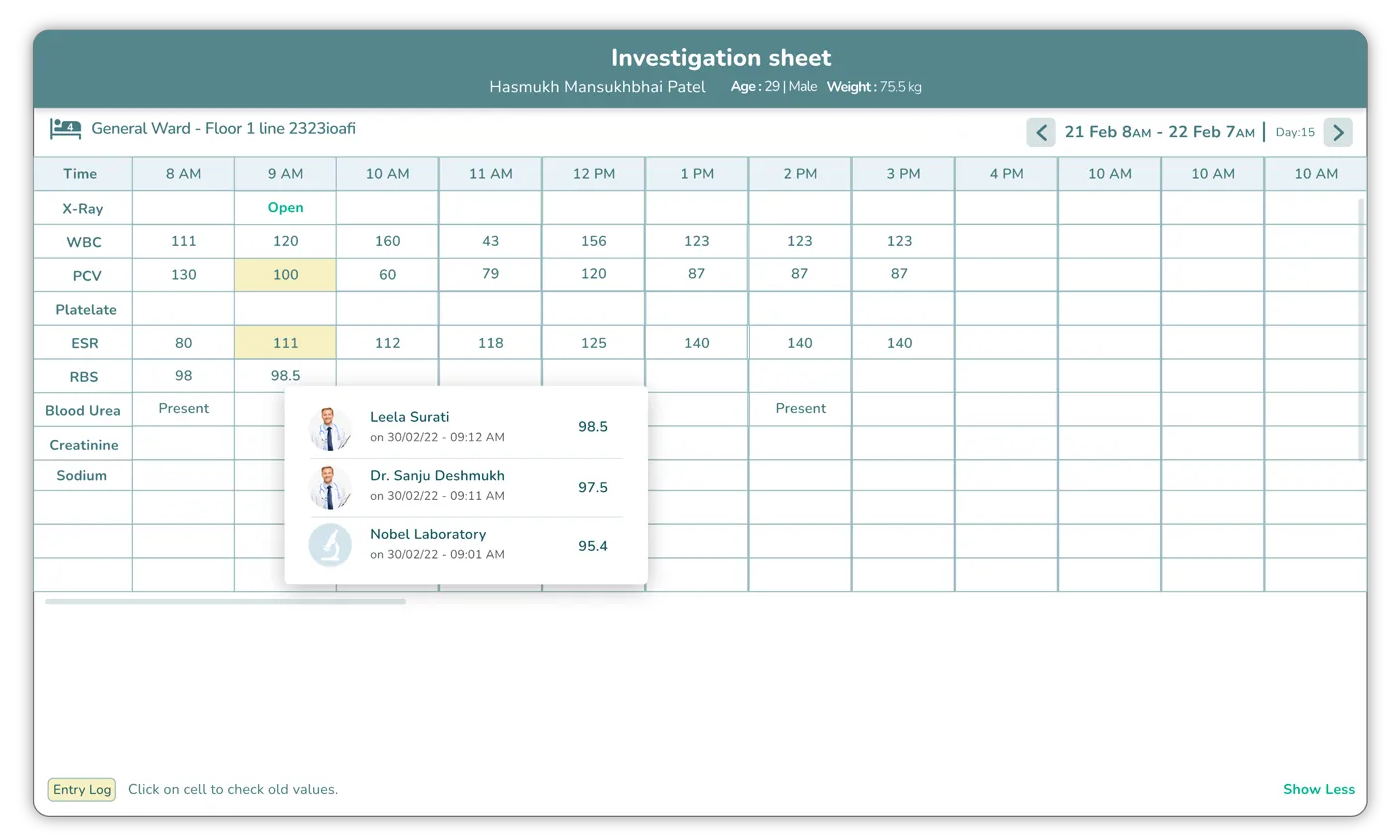
Investigation Sheet
Order lab tests and imaging studies, track sample collection, view results, and auto-include findings in the discharge summary.
Vital Sheet
Record and monitor vital signs (BP, pulse, temperature, SpO2, respiratory rate) with trend charts and configurable recording intervals.
Input/Output & Glucose Monitoring
Track IV fluids, oral intake, urine output, drain output, and blood glucose levels in structured charts with running totals and balance calculations.
Surgery Records
Document pre-operative assessment, intra-operative surgical notes, post-operative care instructions, and surgery-specific billing — all linked to the patient file.
Nursing Care & Catheter Sheets
Structured forms for wound care, catheter insertion/removal tracking, positioning logs, and nursing assessments with configurable templates.
Visual Bed Board
Real-time bed occupancy dashboard with color-coded status (occupied, available, reserved), ward-wise views, and one-click bed transfers.
Auto Discharge Summaries
Generated from admission records, continuity notes, treatment data, investigation results, and surgery details. Review, edit if needed, and finalize in minutes.
Which Hospitals Use Lifemaan for IPD?
Explore More
ICU Management
Ventilator sheets, infusion pump tracking, hourly vitals, health scales, and auto ICU progress notes.
Learn moreOPD Management
Smart OPD scheduling, digital prescriptions, auto-billing, and WhatsApp Rx delivery.
Learn moreBilling
Unified OPD + IPD billing with auto charge capture, GST support, and payment tracking.
Learn moreHospital Management Software
Complete HMS with OPD, IPD, billing, ICU, and patient records — all in one platform.
Learn moreFrequently Asked Questions
Bed, Ward and Room Management
“Do we have a bed?” is the question a hospital answers more often than any other, and on paper it is answered by someone walking to a ward to look. A bed management system replaces that walk with a screen: which beds are free, which are occupied, and which are vacated but not yet cleaned — across every ward at once.
Bed availability at a glance
Every bed carries a live status — free, occupied, or being prepared after a discharge. That third state is the one that matters in practice: a bed whose patient left an hour ago is not yet a bed you can admit into, and a system that shows only free-or-occupied causes exactly the double-allocation it was meant to prevent. Reception and the duty doctor see the same board, so the answer given to a waiting family is the same answer the ward would give.
Wards, rooms and categories
Beds are organised the way your hospital is actually laid out — general ward, semi-private, private rooms, and ICU — with rooms mapped to the ward they belong to. A private room with two beds, a twelve-bed general ward and a four-bed ICU are all described as they exist rather than forced into one flat list, which is what makes the occupancy view meaningful when somebody asks how full the private wing is.
Admission, transfer and discharge
On admission the patient is allocated a bed, and that allocation is part of their record rather than a note in a register. When a patient moves — general ward to ICU as they deteriorate, ICU to semi-private as they recover, or simply to another bed for isolation — the transfer is recorded and their case file follows them. On discharge the bed is released automatically and returns to the board as available once prepared, so nobody has to remember to free it up.
Bed category flows into the bill
Room rent is charged by category, and because the system knows which bed the patient occupied on which days, the rent computes from the actual stay — including the days either side of a transfer, which is the part that is most often got wrong by hand. A patient who spent three days in ICU and four in a semi-private room is billed accordingly without anyone reconstructing the sequence at discharge. See billing and accounting for how bed charges consolidate with pharmacy, procedures and consultations on the final invoice.
What Paper IPD Records Does Lifemaan Replace?
A paper IPD file is a folder of loose sheets that get re-written at every shift and re-typed at discharge. Lifemaan replaces each sheet with a connected digital module so nothing is re-entered and nothing is lost between admission and discharge.
| Paper IPD record | Lifemaan module | What you gain |
|---|---|---|
| Doctor round notes | Continuity Sheet | One chronological timeline accessible to every treating doctor |
| Nursing chart & medication log | Nursing & Treatment Sheets | Timestamped, attributed entries visible to the doctor in real time |
| Vital flowsheet | Vital Sheet | Trend charts with configurable recording intervals |
| Lab / imaging requisition slips | Investigation Sheet | Results tracked and auto-included in the discharge summary |
| Bed allotment register | Visual Bed Board | Live occupancy with one-click transfers |
| Hand-written discharge summary | Auto Discharge Summaries | Assembled from the file and finalised in 2-3 minutes |
IPD is one module of a complete system — to see how it connects to ICU, billing, pharmacy, and EMR, read our guide to the modules of a hospital management system, or book a free demo to walk through the admission-to-discharge flow on your own wards.