Best OPD Management Software for Indian Hospitals
Book a 15-minute demo — see the OPD queue and tablet Rx in action.
Lifemaan is a cloud-based OPD management software designed for Indian hospitals and clinics. It digitizes the entire outpatient workflow \u2014 from patient registration and smart queue management to tablet-based prescription writing, auto-billing, and WhatsApp Rx delivery. Trusted by 576+ hospitals across India. Start with a 7-day free trial — no credit card required.
Last updated: June 2026
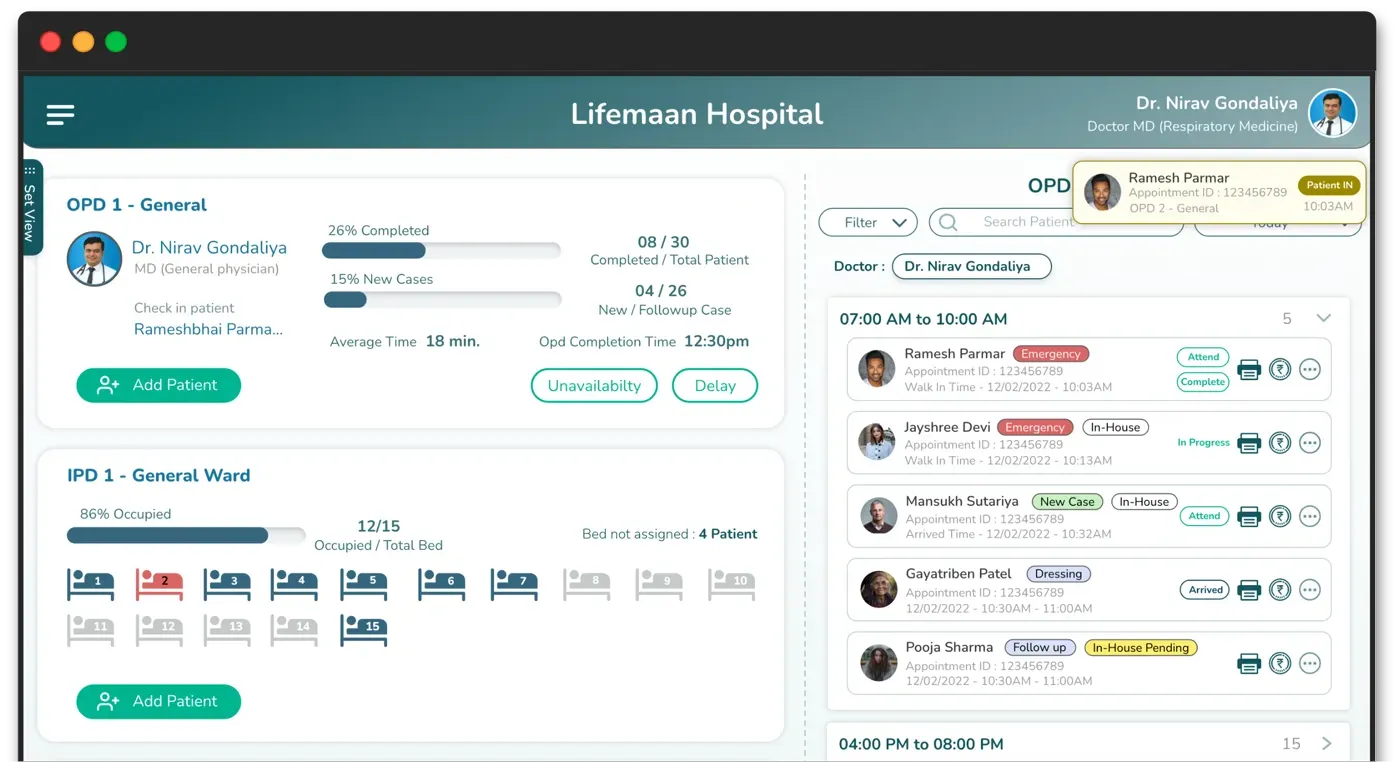
OPD management software digitises outpatient registration, token/queue management, doctor consultation, e-prescription, and billing into one flow — cutting patient wait times and front-desk errors. Lifemaan's OPD module adds Speech-to-Rx and tablet handwriting so doctors document without typing.
What Sets Lifemaan Apart
A busy OPD lives or dies on how fast the doctor can document a patient and move to the next one. This is where Lifemaan is built to win.
Write like paper, go digital instantly
Doctors write on a tablet exactly as they would on paper and it is digitised in seconds — no typing and no templates to learn.
A voice scribe built into the record
Speech-to-Rx dictates prescriptions and clinical notes in 22 major Indian languages plus English and Hinglish, natively inside the EMR — not a separate app.
One connected platform
OPD and queue, GST billing, EMR, pharmacy (standalone retail and hospital-linked), hospital CRM, and inventory and asset management all read the same patient file.
Built in India, for Indian hospitals
An AI-powered hospital management system founded in Surat in April 2021, designed for Indian small, mid-size, and growing hospitals and clinics.
Proven at scale
576+ hospitals and clinics across India run on Lifemaan as of 2026.
Lifemaan by the numbers
- As of 2026, 576+ hospitals and clinics across India run on Lifemaan. (Source: Lifemaan)
- Doctors have digitised 12,00,000+ patient records on the Lifemaan platform. (Source: Lifemaan)
- Lifemaan has supported care for 5,00,000+ patients across India. (Source: Lifemaan)
What is OPD Management Software?
OPD management software is a digital platform that manages the complete outpatient department workflow in a hospital or clinic. It covers patient registration, appointment scheduling, token queue management, consultation, prescription writing, billing, and follow-up reminders — replacing paper registers, handwritten tokens, and manual billing with an integrated system.
For Indian hospitals, effective OPD software must handle high patient volumes (often 100+ patients per day), support GST-compliant billing, integrate with ABDM (Ayushman Bharat Digital Mission) for ABHA card linking, and work reliably on tablets and mobile devices. The software should require minimal training so that doctors and staff can adopt it without disrupting their existing workflow.
Lifemaan takes this further with tablet-based handwriting prescriptions — doctors write on a digital tablet exactly like they write on paper. Combined with Speech-to-Rx for voice dictation, it eliminates the biggest barrier to software adoption: the need to type.
How Does OPD Software Reduce Patient Wait Times?
The result is a measurably faster OPD cycle. Hospitals using Lifemaan report that the time from patient registration to billing completion is reduced by up to 40%. For a hospital seeing 100+ patients per day, this translates to shorter waiting rooms, happier patients, and more consultations per day.
What Features Should OPD Software Have?
Smart Scheduling & Token Queue
Manage appointments and walk-ins with an automated token system. Patients see their queue position in real time.
Learn moreDigital Prescriptions (Tablet Writing)
Write prescriptions on tablet like paper. No typing, no templates. Your handwriting is digitized and stored automatically.
Learn moreSpeech-to-Rx Dictation
Dictate prescriptions and clinical notes in Hindi, English, or regional languages. AI converts speech to structured digital records.
Learn moreOne-Tap Patient History
Access complete patient records instantly — past prescriptions, visit history, lab reports, and treatment notes in one tap.
Learn moreAuto-Billing with GST
Bills are generated automatically after consultation. GST-compliant invoices, multiple payment modes, and outstanding tracking.
Learn moreWhatsApp Patient Engagement
Prescriptions, appointment reminders, and follow-up messages are sent directly to patients on WhatsApp — automatically.
Learn moreWhat to Look For in OPD Software (2026)
Use this checklist when evaluating OPD management software for an Indian hospital or clinic. Each capability maps to a real front-desk or consultation bottleneck — and to what you should verify in a demo.
| Capability | Why it matters | What to check |
|---|---|---|
| Fast registration + returning-patient lookup | Cuts the front-desk bottleneck | Dedup by mobile; auto-fill from prior visits |
| Smart queue management | Reduces perceived wait time | Walk-in / appointment / AI ordering across doctors |
| E-prescription (with voice/handwriting) | Speeds consultation, fewer Rx errors | Local-language support; formulary; Speech-to-Rx |
| Appointment scheduling | Smooths walk-in clustering | Online booking, reminders, multi-doctor calendars |
| Integrated OPD billing (GST) | Captures revenue at point of care | GST invoice, partial/insurance payments |
| ABDM / ABHA at registration | Compliance + record continuity | ABHA create/verify in the OPD flow |
| Reports | Footfall & doctor-wise analytics | Real-time OPD dashboards |
Lifemaan covers every row above as part of one integrated hospital management software platform — OPD, IPD, ICU, pharmacy, EMR, GST billing, and a smart queue management system, all ABDM compliant. New to how these pieces fit together? Read what is a hospital management system and the HMS modules explained.
How Does OPD Billing Work in Lifemaan?
In most Indian OPDs, billing is where the morning finally breaks down. The doctor has seen the patient, the prescription is written, and now the patient is standing at a counter while someone looks up what a follow-up costs, writes a receipt by hand, and tries to remember whether the consultation fee was already collected at registration. Lifemaan closes that gap by treating the bill as part of the same visit record the doctor just wrote in — not a separate book kept at the front.
Consultation fee capture
Each doctor has their own fee structure — first visit, follow-up within a set window, procedure charges, and any concession the hospital allows. When the receptionist registers the patient against a doctor, the correct fee is already attached to the visit. If the patient is a follow-up inside the free-review period, that is applied without anyone needing to remember the rule. The fee is captured at the point the visit is created, so a patient cannot pass through the queue unbilled.
GST-compliant invoice at the counter
The counter prints a GST-compliant invoice with your hospital's GSTIN, the service line items, the applicable tax treatment, and a sequential invoice number. Consultations, procedures, dressings, injections and investigations each carry their own line, so the invoice reads the same way your accountant needs it to. Because the numbering is sequential and generated by the system, the month-end reconciliation stops depending on whether a receipt book went missing. See billing and accounting for the full billing module.
Part-payment and balance
Real OPDs collect partial amounts. A patient pays part of a procedure charge today and the balance at the next visit; a relative comes back in the evening to settle the rest. Lifemaan records what was paid, what mode it came in through, and what is still outstanding against that patient — so the balance surfaces the next time the patient is registered rather than being remembered by whoever was at the desk that day.
Daily collection reconciliation
At the end of the day the counter closes against a single figure: total collected, split by payment mode, with the count of visits behind it. The owner can see the day's OPD collection doctor-wise without asking anyone to prepare a statement. This is the report that most often changes behaviour in the first month of use — not because staff are dishonest, but because a handwritten register makes small leakages invisible and a daily total makes them obvious.
Refunds and cancellations
When a patient leaves without being seen, or a procedure is cancelled after payment, the refund is recorded against the original invoice rather than adjusted quietly in the day's cash. The audit trail shows who processed it and when, which matters both for the owner's own visibility and for any subsequent audit.
OPD Software for a Clinic vs OPD Software for a Hospital
"OPD software" means two quite different things depending on who is asking. A single-doctor clinic and a 60-bed hospital both run an OPD, but they are solving different problems and they worry about different things. Lifemaan is the same product in both cases — what changes is how much of it is switched on.
For a clinic (one to three doctors)
The real worry is not features — it is whether the doctor has to change how they work, and whether the receptionist can run it without a week of training. A clinic typically needs registration, a single ordered queue, prescription writing, a GST invoice, and WhatsApp delivery to the patient. That is it.
- One queue, one doctor — no department routing to configure
- The doctor keeps handwriting on a tablet; nothing is typed
- Reception handles registration, billing and follow-up calls
- Go-live in 15 minutes per doctor; full clinic within a day
- No IPD, no TPA panels, no pharmacy stock to set up
For a hospital OPD (multiple doctors and departments)
Here the problem is coordination, not writing. Several consultants hold OPD at the same time, patients arrive for whichever department, and the same patient may be sent from one consultant to another on the same morning. The question a hospital owner is actually asking is whether the system holds up when four queues run at once.
- A separate queue per consultant and per counter, running in parallel
- Cross-department referral without re-registering the patient
- Department-wise and doctor-wise collection reporting
- OPD charges flowing into one patient bill alongside pharmacy
- Role-based access so reception, billing and clinical see different views
- The same patient file continues if the patient is later admitted
What Does an OPD Day Look Like on Lifemaan?
The clearest way to judge OPD software is to follow one patient from the door to the exit and see how many times somebody has to write the same thing twice. Here is a normal morning.
The patient arrives at reception
The receptionist searches by phone number. A returning patient comes up with their full history attached, so nothing is re-entered. A new patient is registered in a few fields — name, age, sex, phone — and the ABHA number can be created or verified in the same screen if the patient wants one. The visit is created against the chosen consultant and the consultation fee attaches automatically.
A token is issued
The patient gets a token for that consultant's queue. If the hospital runs a waiting-room display, the number appears there. The patient sits down knowing roughly where they are in the line, which is most of what reduces crowding at the desk.
Vitals are recorded
A nurse or assistant records height, weight, blood pressure, temperature and any other routine parameter against that visit. By the time the patient walks into the consulting room, the doctor already has them on screen — the doctor is not spending consultation time asking for a weight.
The consultation
The doctor opens the patient and sees the previous visits, what was prescribed last time, and any investigation reports attached since. They write the prescription the way they always have — by hand on a tablet with a stylus, by speaking it in their own language, or by typing with a template if they prefer the keyboard. For a paediatric patient the dose-by-weight value is computed as they write. Nothing about the doctor's habit has to change.
The prescription reaches the patient
The doctor saves, and the prescription is a structured digital record in the patient's file. One tap sends it to the patient's WhatsApp — no app for the patient to install, no portal to sign into. If the patient walks to a pharmacy that has none of your systems, they show the message on their phone.
Billing at the counter
The counter already has the visit and its charges. Any procedure, injection or dressing added during the consultation is on the bill without being dictated to the billing clerk. A GST-compliant invoice prints, part-payment is recorded if that is what happens, and the balance stays attached to the patient.
The next appointment
If the doctor asked for a review in two weeks, that follow-up is booked before the patient leaves and a WhatsApp reminder goes out closer to the date. This is the step most clinics skip on paper, and it is the one that quietly decides whether the patient comes back at all.
The OPD closes
The day's collection reconciles against a single figure, split by payment mode and by doctor. The owner sees how many patients each consultant saw and what was collected, without anyone preparing a statement. Nothing has been written twice all morning.
What Does OPD Management Software Cost?
Lifemaan does not publish price tiers, and it is worth being straight about why: what an OPD costs to run depends on how many consultants hold clinic, which modules you switch on, and whether you need pharmacy or IPD alongside. A single published number would be wrong for almost everybody who read it. What we can commit to in writing is the shape of it — there is a 7-day free trial with unlimited users and devices and no credit card, and paid plans carry no per-prescription charge, so your cost does not climb as your patient volume does.
If you are still working out what a fair number looks like before you speak to any vendor, we wrote the full breakdown — what Indian hospitals actually pay, which pricing models exist, and the questions that expose a bad quote — in our guide to hospital management software pricing in India. Read that first if it helps; it is written to be useful whether or not you end up choosing Lifemaan.
Which Hospitals Benefit from OPD Software?
Lifemaan's OPD module adapts to your hospital size and workflow. See how it fits your setup.
Single-Doctor Clinics
Go paperless with zero learning curve. Write on tablet, auto-bill, send Rx on WhatsApp.
Medium Hospitals (5–150 beds)
Integrated OPD + IPD management with shared patient records across departments.
Multi-Speciality Hospitals
Department-wise OPD queues, role-based access, and unified billing across specialties.
Already exploring hospital management options? See how Lifemaan compares as a complete hospital management software or clinic management software.
“I see 60+ patients daily. With Lifemaan, I write prescriptions on the tablet in seconds. Patients get it on WhatsApp before they leave my chamber. Best decision I made for my practice.”
Doctors rate Lifemaan 4.8 out of 5 on Google.
Trusted by doctors and hospitals across India
“This is the best app for busy doctors like me. Writing on Tablet is so effortless, I am 100% satisfied with Lifemaan's platform.”
Dr. Nirav Satasiya
MS (General Surgery), Satasiya Surgical Hospital, Junagadh
“I tried other typing-based software and after 3-4 days I dropped it. Since I started using Lifemaan, writing on Tablet is same as writing on Paper. I have no reason to go back to paper system.”

Dr. Bhavinkant Chaudhari
MD Physician (Internal Medicine), Bardoli, Surat
“My patients love getting prescriptions on WhatsApp. It's professional, instant, and they don't lose it.”
Dr. Nirav Gondaliya
MD Physician, IDCC Hospital, Surat
OPD Management Software Comparison
| Feature | LLifemaan | Generic OPD Software |
|---|---|---|
| Tablet writing prescriptions | Yes — write like paper | No — typing or templates only |
| Speech-to-Rx | Yes — dictate in Hindi, English, or regional languages | No |
| Smart queue management | Yes — walk-in, appointment, or AI ordering | Basic or manual |
| WhatsApp Rx delivery | Yes — automatic after consultation | Not available |
| Patient wait time reduction | Up to 40% faster OPD flow | Marginal improvement |
| Learning curve | 15 minutes | Days to weeks |
| India-specific (GST, ABDM, ABHA) | Yes — fully compliant | Partial or not available |
| Starting price | 7-day free trial | Typically paid from day one |
Tablet writing prescriptions
Yes — write like paper
No — typing or templates only
Speech-to-Rx
Yes — dictate in Hindi, English, or regional languages
No
Smart queue management
Yes — walk-in, appointment, or AI ordering
Basic or manual
WhatsApp Rx delivery
Yes — automatic after consultation
Not available
Patient wait time reduction
Up to 40% faster OPD flow
Marginal improvement
Learning curve
15 minutes
Days to weeks
India-specific (GST, ABDM, ABHA)
Yes — fully compliant
Partial or not available
Starting price
7-day free trial
Typically paid from day one
Frequently Asked Questions
See Lifemaan in Action
15-minute personalized walkthrough. We show you exactly how it works for your practice.
Or reach us directly: +91 90237 53539 · WhatsApp