Write your ortho Rx exactly like you write on paper.
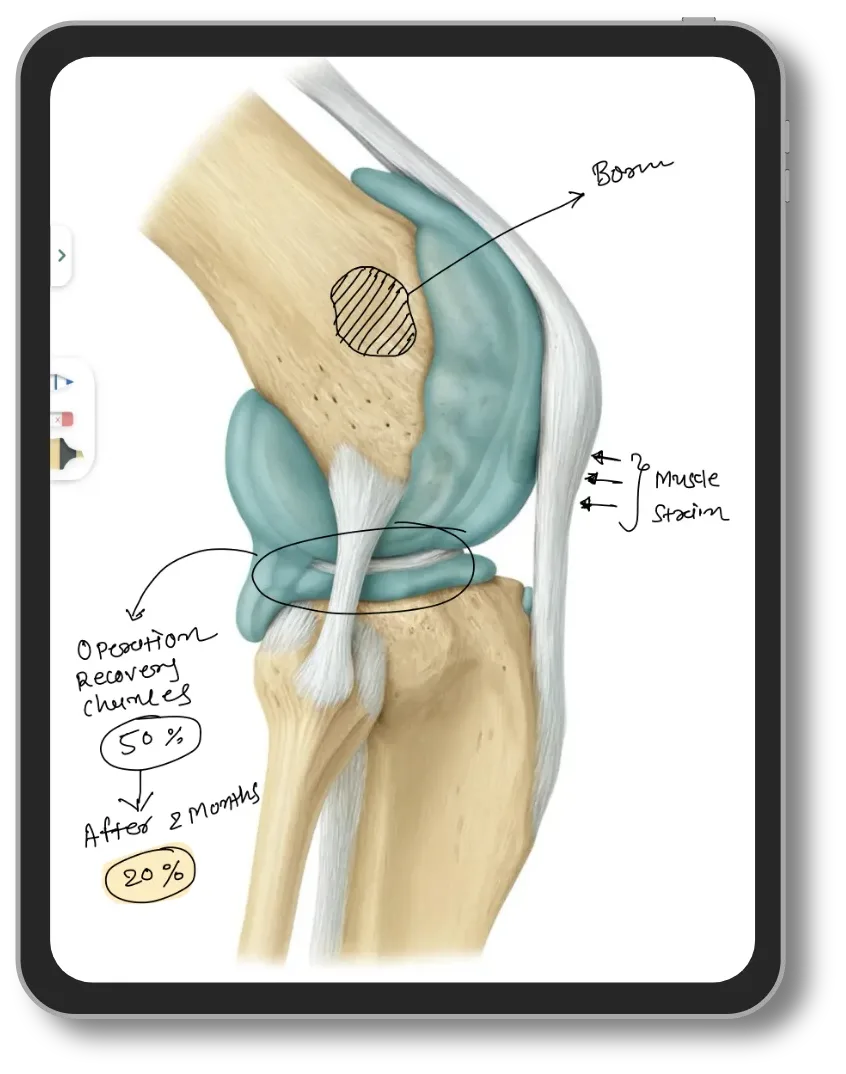
No typing. No new habit. The prescription is digital the moment you lift the pen — and the joint mapping sheet, the pre-op and post-op films, and the implant record are already in the app.
In short
- Lifemaan ships orthopaedic examination templates — knee and joint mapping, trauma, and post-op review — that the surgeon marks up with a pen on a tablet exactly like paper.
- Pre-op and post-op films open on one screen with a visit timeline, so union progress can be shown to the patient during the consultation.
- Implant make, model, size and batch number are stored in a dedicated field that can be searched and reported on years later for a revision.
- Follow-ups carry a purpose — "joint replacement, 15 days", "implant follow-up, 6 weeks" — not just a date.
- The handwritten prescription is digital the moment the pen lifts and goes to the patient on WhatsApp; ortho OT, discharge summary and implant billing run off the same record.
- ABDM compliant, used by 576+ hospitals across India, rated 4.8 on Google.
Last updated: July 2026
The joint mapping sheet is already in the app
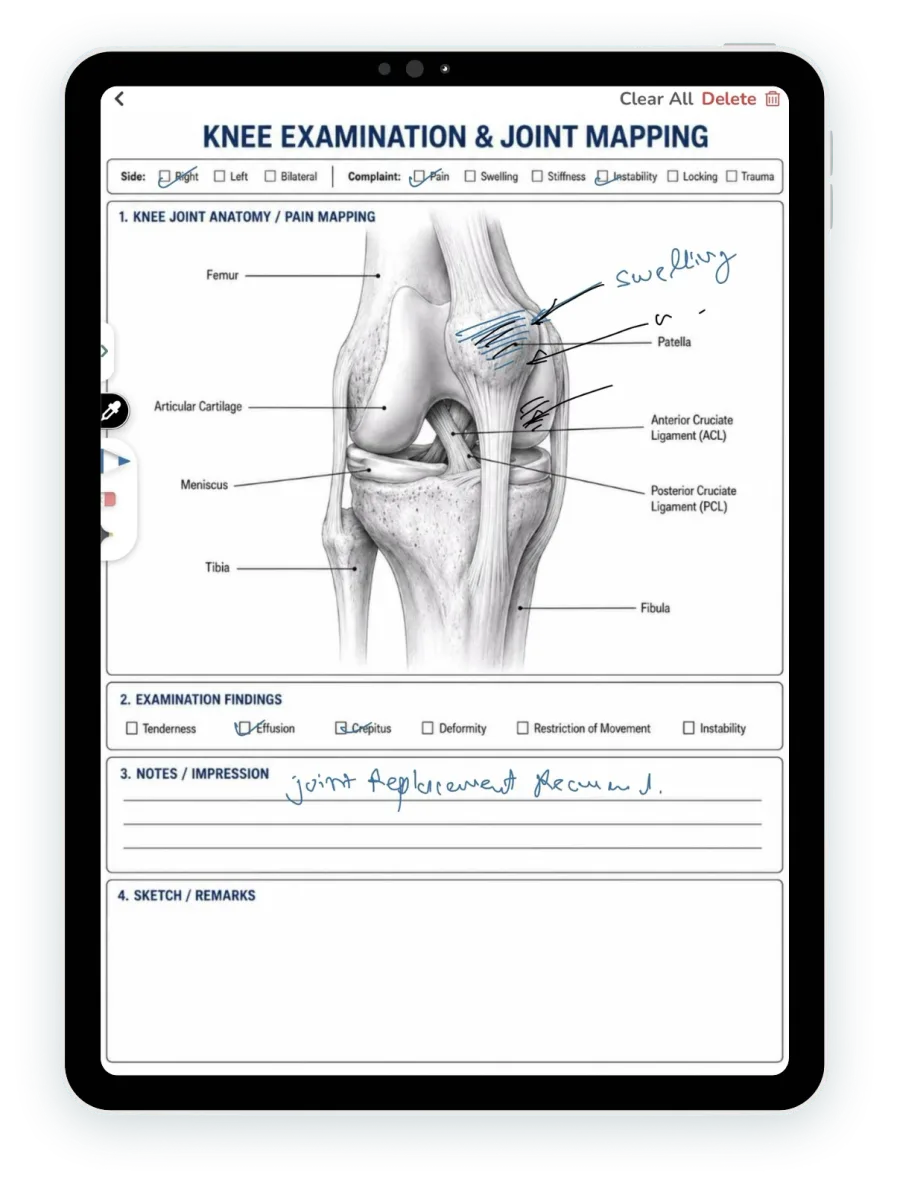
Open the knee sheet and the anatomy is printed on it — femur, patella, articular cartilage, meniscus, ACL, PCL, tibia, fibula. You mark it with the stylus the way you mark paper: shade the effusion, arrow the tender point, write “swelling” next to it in your own hand. There is no shape palette and no drawing tool to learn. The pen behaves like a pen.
Above the diagram, the structured rows do the parts that should not be prose: Side — right, left, bilateral. Complaint — pain, swelling, stiffness, instability, locking, trauma. Examination findings — tenderness, effusion, crepitus, deformity, restriction of movement, instability. Below it, Notes and Impression, then a free Sketch and Remarks box for whatever the printed sheet did not anticipate.
A trauma sheet and a post-op review sheet ship the same way. Nothing has to be configured before your first OPD, and if the sheet is not quite your sheet, a custom form or a changed field is set up for your practice on request — a spine sheet, a shoulder sheet, a weight-bearing row added to the post-op review.
Before and after, on one screen, in front of the patient
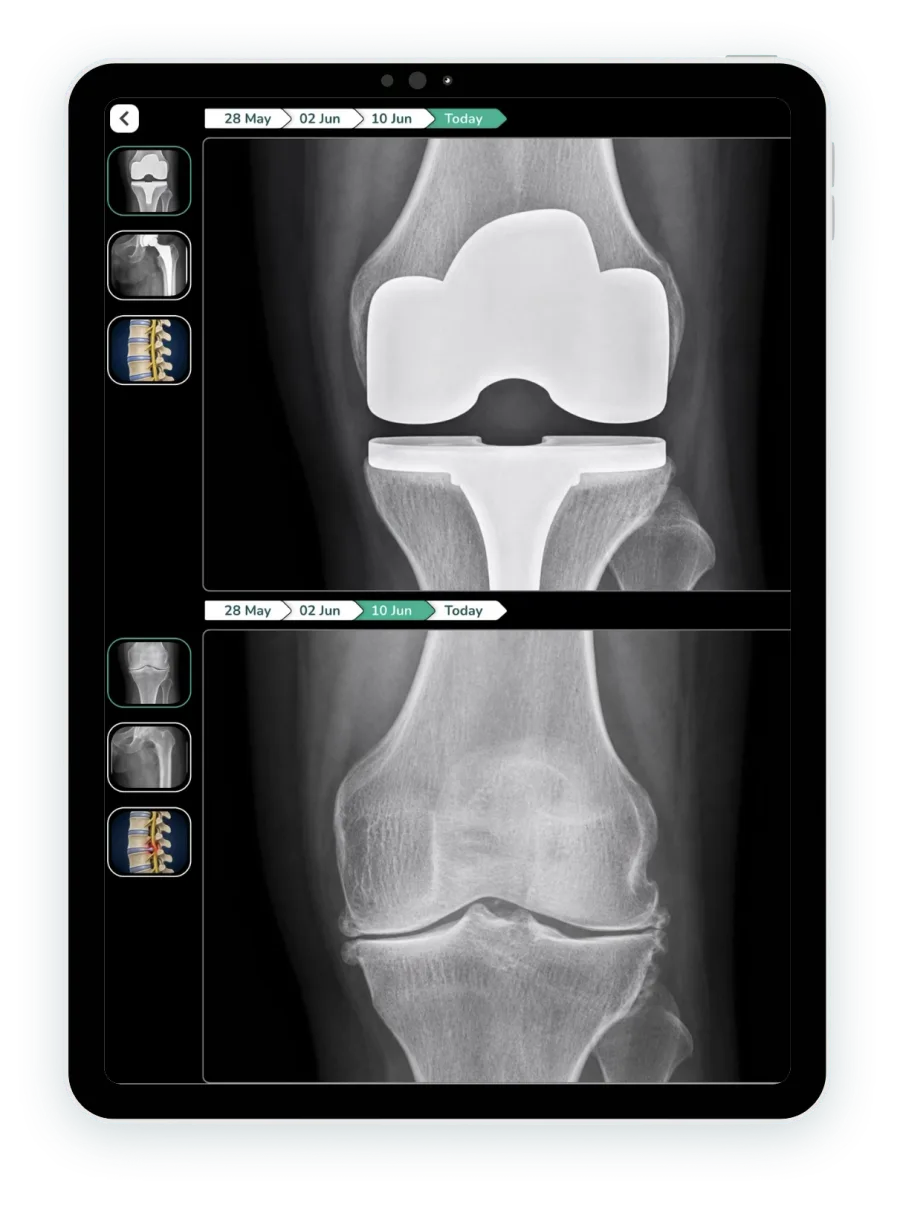
Pull the pre-op film and the post-op film onto the same screen. Each panel carries its own visit timeline across the top — 28 May, 02 June, 10 June, today — so you move between dates by tapping them rather than digging through a folder. Thumbnails down the side switch between the knee, the hip and the spine series for the same patient.
Zoom in on the implant. Show the arthritic joint from before and the prosthesis in place now, one above the other, while the patient is still in the chair. A patient who has been asking “is it healing?” at every visit stops asking once they have seen the two films together — and a patient who can see their own union progress is a patient who turns up for the next review.
This is the same mechanism behind writing on the tablet: the consultation stays a conversation with something to point at, instead of a conversation across a monitor.
The patient forgets the file. You don't.
Orthopaedics is a longitudinal specialty and the paper trail is the first casualty of it. A knee that starts as conservative management becomes an injection, then an arthroscopy, then a replacement, then two years of implant follow-up — and by the time the revision question comes up, the patient is carrying a plastic bag with three of the eight films in it. The X-ray from the day of injury, the one that settles whether this was always a varus knee, is the one that went missing.
In Lifemaan the whole course sits on one timeline against the patient: every visit, every prescription, every marked-up mapping sheet, every film, in the order they happened. You open it in one tap while the patient is sitting down. Nobody has to remember which year the first injection was given.
Implant details are stored in their own field — make, model, size, batch or lot number — against the patient and the procedure, not written into the middle of a note where nobody will find it. Because it is a field, it is searchable and it can be pulled as a report: which patients received which implant, in which size, from which batch. Years later, when a revision is being planned, knowing exactly what is in the joint before you open it is the difference between a planned revision and a surprise.
A follow-up with a purpose attached
A date on its own is an admin fact. A follow-up in Lifemaan carries the reason with it — “joint replacement, 15 days”, “post-op review”, “physio check”, “implant follow-up”. The purpose travels with the appointment, so the front desk booking the slot knows what the visit is for, and so does whoever sees the list on the day.
The reason this matters more in orthopaedics than in most specialties: a missed six-week review after a fracture fixation is a clinical problem, not a scheduling one. That is the visit where union is assessed and weight-bearing is advanced. If it slips by three weeks nobody notices in a diary full of undifferentiated appointments — but a post-op review that has not happened is visible when the appointment says what it was for.
What actually goes on an orthopaedic record
A generic consultation screen assumes the record is a complaint, a diagnosis and a medicine list. An orthopaedic record is mostly neither — it is measurements, grades and a status that has to be comparable to the same measurement taken six weeks ago. The sheets are handwritten, so anything you would have written on paper you write here; the structured rows and the custom fields cover what you want back as data.
Range of motion
Flexion and extension in degrees, recorded visit by visit so the trend is visible rather than remembered. A knee at 90° at six weeks and 110° at twelve is a different conversation from a knee stuck at 90°.
Weight-bearing status
Non-weight-bearing, partial, full — NWB to PWB to FWB is the spine of a post-op plan, and it is the instruction the patient most often gets wrong between visits.
Union status
United, delayed union, non-union on fracture follow-up — the one field that decides whether the next visit is a review or a theatre booking.
Implant details
Make, model, size, batch or lot number, in a dedicated searchable field against the patient and the procedure. This is the field a revision case depends on.
Kellgren–Lawrence grading
Osteoarthritis severity graded off the film, recorded alongside the film it was graded from, so the grade and its evidence stay together.
Special tests
Lachman, anterior drawer, McMurray for the knee; Neer and Hawkins for the shoulder — positive or negative, on the sheet, at the visit they were performed.
Fracture classification
AO/OTA classification for the fracture pattern, and Gustilo–Anderson grading where the fracture is open — written on the trauma sheet with the mechanism of injury.
Patient-reported scores
Oxford Knee Score, Harris Hip Score, VAS, WOMAC — write the score onto the sheet in your own hand, exactly as on paper. It stays with that visit and reopens with it, so the score you gave at six weeks is in front of you at twelve.
Where you want one of these as a structured row rather than handwriting — a weight-bearing row on the post-op review sheet, a ROM pair on the knee sheet — say so and it is added as a custom field on your forms. The starting point is the sheet you already use, not a template you have to argue with.
Ortho OT, discharge summary and implant billing — one record
An implant case does not stop at the consultation. It goes to the OT list, into the post-op ward, out through a discharge summary, and finally into a bill that has to reconcile a package against a consumable. In Lifemaan those are views of the same patient file, not three systems that somebody has to re-key at the end of the month.
Ortho OT scheduling captures the procedure, the surgeon and the case against the patient. The post-op ward runs through IPD, and the discharge summary is built from the treatment record rather than typed out again from the file. Pharmacy and inventory sit behind the same record.
Ortho bills differently, and the billing has to admit that
Orthopaedics is one of the few specialties where a single consumable can be the largest line on the invoice. Four patterns cover most ortho practices, and Lifemaan is configured for them rather than forcing an implant case through a generalist OPD bill:
Implant cost pass-through — The implant billed as its own line, separate from the surgical package — which is how most ortho cases actually invoice, and what the patient and the payer both want to see itemised.
TKR and THR surgical packages — Total knee and total hip replacement priced as a bundled package, with the implant sitting outside or inside the bundle depending on how your practice quotes it.
Physiotherapy session blocks — Post-op physiotherapy sold as a block of sessions and drawn down visit by visit, rather than billed as a fresh consultation each time.
Zero-value post-op follow-ups — The visits already covered by the package still have to exist in the record — the review happened, the film was taken, the note was written — while billing at zero. They stay on the timeline instead of falling out of it to avoid a charge.
How an orthopaedic surgeon runs a post-op knee review in Lifemaan
- 1
Open the patient — two years of visits are already on one timeline, with every film and every prescription attached to the visit it came from.
- 2
Open the post-op review sheet and mark the findings with the pen, the way you would mark the paper sheet.
- 3
Pull the pre-op and the latest film side by side and show the patient the union progress on the screen.
- 4
Dictate the history in Hindi and let LaMa AI fill the form.
- 5
Write the prescription by hand on the tablet — it is digital the moment the pen lifts.
- 6
Set the next follow-up with a purpose attached: "implant follow-up, 6 weeks".
- 7
The prescription goes to the patient’s WhatsApp; the bill and the discharge summary run off the same record.
The dictation step uses Speech-to-Rx and the writing step uses tablet writing — both already live, both usable in the same consultation. Surgeons running a broader operative list may also want the general surgery page.
The orthopaedic case, step by step, against what handles it
A knee that ends in a replacement passes through eight or nine distinct steps over two years. Each one maps to something already built.
| Orthopaedic step | How Lifemaan handles it |
|---|---|
| First OPD for a painful joint | The knee and joint mapping sheet opens on the tablet. Side, complaint and examination findings ticked on the structured rows; the effusion shaded and the tender point arrowed with the pen. |
| Reviewing the films | Films attach to the visit they were taken at. Any two open together on one screen with a visit timeline above each, and both zoom. |
| Months of conservative management | Injections, physiotherapy advice and each prescription sit on one patient timeline in the order they happened — no reconstruction from a bag of paper. |
| A trauma presentation | The trauma sheet, with the mechanism of injury dictated in Hindi and the form filled by LaMa AI while the pen stays free for the diagram. |
| Booking and doing the surgery | Ortho OT scheduling captures the procedure, the surgeon and the case against the patient file rather than a separate theatre register. |
| Recording what was implanted | Make, model, size and batch or lot number go into a dedicated field against the patient and the procedure — searchable, and pullable as a report years later when a revision is planned. |
| Post-operative ward and discharge | The post-op ward runs through IPD; the discharge summary is built from the treatment record instead of typed out again. |
| Post-op reviews and physio | Follow-ups carry their purpose — "post-op review", "implant follow-up, 6 weeks", "physio check" — and the prescription goes to the patient on WhatsApp. |
| Billing the case | The implant as its own line, the TKR or THR package, the physiotherapy block, and the package visits that bill at zero without dropping out of the record. |
| Making the record portable | ABDM compliant — ABHA created and linked from the patient record, so a file that spans years travels with the patient. |
For the platform underneath all of it, see OPD management and IPD management, or book a demo and bring one of your own revision cases to it.
ABDM and the orthopaedic record
Lifemaan is ABDM compliant: ABHA can be created and linked from the patient record, so an orthopaedic file that spans years of conservative management, surgery and implant follow-up travels with the patient under the Ayushman Bharat Digital Mission instead of living only in your practice.
Underneath that, the record itself stays retrievable: the implant field with make, model, size and batch number, the operative record, the discharge summary and the films, all against one patient and all pullable when you are the one who has to produce them.
“I was skeptical about going digital, but Lifemaan made it easy. I write on the tablet like I wrote on paper. My surgery notes, OPD prescriptions — everything is saved and accessible.”
Dr. Hardik Sheth
Orthopaedic Surgeon, Niramay Hospital, Surat
It runs the rest of your hospital too
The ortho sheets sit on top of the same platform that runs the OPD queue, the post-op ward, the pharmacy and the accounts.
OPD
Token queue, consultation, e-prescription.
IPD & post-op ward
Admission, beds, post-operative stay.
Discharge summary
Built from the treatment record.
Billing
Packages, implants, physio, GST.
Ortho OT · Pharmacy · Inventory · Hospital CRM run off the same patient record.
Orthopaedic Practice Software — Frequently Asked Questions
See Lifemaan in Action
15-minute personalized walkthrough. We show you exactly how it works for your practice.
Or reach us directly: +91 90237 53539 · WhatsApp