
Hospital Management Software for 10–100 Bed Hospitals
Built for general medicine hospitals, orthopedic hospitals, surgery centres, gynaecology hospitals, and small multi-speciality hospitals. Full OPD + IPD + ICU + pharmacy + billing in one platform. Trusted by 576+ hospitals across India.
Lifemaan is hospital management software built for 10–100 bed hospitals. It covers OPD, IPD, ICU, pharmacy, billing, and TPA workflows under one tenant — with a Visual Bed Board for real-time occupancy, auto-generated discharge summaries reviewed in 2–3 minutes, ICU charting (ventilator, infusion, vitals, GCS/Ramsay/Braden, VAP bundle), and pharmacy charges that flow straight into the patient bill. Used across 576+ hospitals in India.
Last updated: May 2026
The gap Lifemaan fills
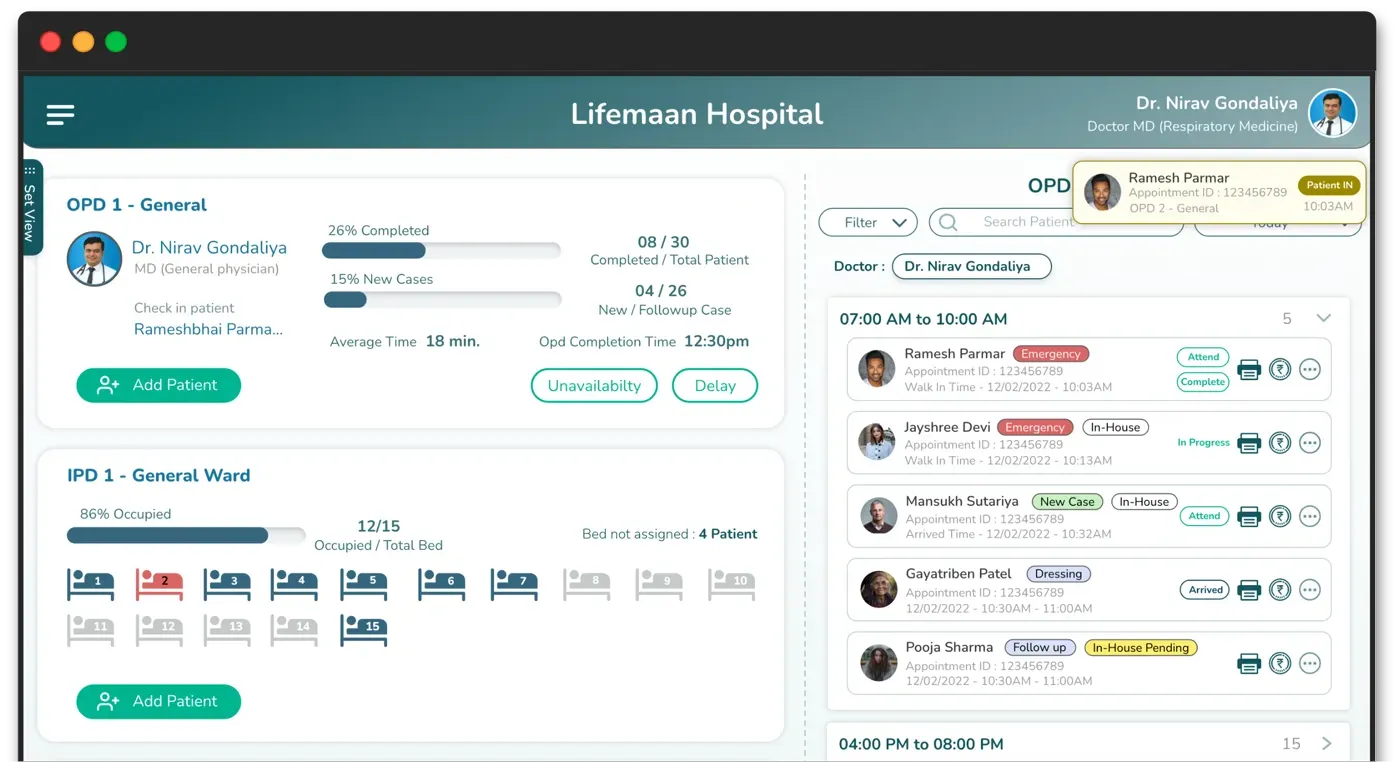
Mid-size hospitals sit between two bad options. Enterprise HMS vendors are built for 300+ beds — implementation timelines and professional-services costs don't match a mid-size hospital's economics. Clinic-only tools cap out the moment IPD, ICU, pharmacy stock, or TPA workflows enter the picture. Lifemaan is sized for this gap, with every module on the same tenant and the same patient file.
What this page covers
- 1Admission-to-discharge flow on the Visual Bed Board
- 2ICU charting patterns for the nursing team
- 3Pharmacy dispensing flowing into the patient bill
- 4TPA workflow from pre-authorisation to cashless settlement
- 5Auto-generated discharge summary reviewed in 2–3 minutes
- 6Reporting the management team reads without extra dashboards
Why Lifemaan for Medium-Size Hospitals?
Hospital management software that fits how mid-size hospitals actually work — no enterprise complexity, no clinic-only ceiling.
OPD + IPD + ICU in One Platform
Single tenant for outpatient queues, inpatient admissions, and ICU charting — no separate systems to reconcile.
No Typing Required
Doctors write prescriptions and progress notes on a tablet — same handwriting as paper.
Built for Mid-Size Economics
Hospital-grade modules priced for 10–100 bed hospitals — not enterprise budget, not clinic-only feature set.
Why Mid-Size Hospitals Are Replacing Their First-Generation HMS in 2026
A meaningful share of mid-size Indian hospitals adopted a first-generation HMS years ago — typically a desktop-based, on-premise system designed when the workflow assumption was a typing-based reception and a paper-based clinical record. Those systems handled registration, basic billing, and rudimentary record storage. They did not handle tablet-based prescription writing, voice dictation, ABDM linkage, Visual Bed Board, or auto-generated discharge summaries — none of those patterns existed in mainstream use when those systems were architected.
The hospitals replacing their first-generation HMS are usually solving four problems at once:
Prescriptions incomplete
The existing system is typing-only, so consultants write on paper and the digital record stays incomplete — unusable for follow-up or ABDM sharing.
Discharge summaries take 20–30 minutes
Dictation and typing at the end of a shift — when fatigue is highest. Consultants delay discharges rather than write them. Lifemaan compiles the draft from data already captured.
Billing leakage
The existing system does not link pharmacy dispensing to the patient bill, so items leave the store without being billed. A common and silent revenue loss.
Not ABDM compliant
The existing system was not designed for the consent flow the national digital health ecosystem requires. ABDM onboarding on it is a bolt-on, not a foundation.
Lifemaan addresses all four on the same platform, which is why the replacement conversation is increasingly a single project rather than four separate tool evaluations.
The Make-or-Break Variable: Consultant Adoption
Consultant adoption is the make-or-break variable in a mid-size hospital rollout. Lifemaan's tablet-writing and Speech-to-Rx flows are designed so the consultant does not have to change how they write prescriptions or how they document the round. The structured digital record is produced from the consultant's native consultation pattern rather than by forcing them into a typed-template flow. This single design choice is why Lifemaan tends to retain consultants beyond the initial enthusiasm period that other HMS rollouts often lose.
Why Mid-Size Hospitals Struggle With HMS Choices
A 10–100 bed hospital usually falls into a gap — enterprise vendors are too large and slow, clinic tools are too narrow. The result is a patchwork that quietly leaks revenue.
Multi-Department Coordination on One Tenant
OPD, IPD, ICU, pharmacy, and billing all sit on a single Lifemaan tenant — the same patient file flows through every department without re-entry.
OPD
Register, consult, admit
IPD
Bed Board, ward rounds, notes
ICU
Charting, vitals, scoring
Pharmacy
Dispense → bill line item
Billing
Consolidated GST invoice
Role-based access keeps the right people on the right screens — the OPD reception sees the queue, the IPD nurse sees the ward, the ICU staff sees the charting, the billing counter sees the bill, and the admin sees everything in summary. No one is forced through screens that don't apply to their job.
A Medium Hospital's Admission-to-Discharge Flow on Lifemaan
A walkthrough of how a typical admission moves through Lifemaan from OPD entry to the consolidated GST bill:
- 1.OPD entry. The patient is registered at the OPD counter, sees the consultant, and is advised admission. The OPD case sheet — including the diagnosis, the proposed plan, and any pre-admission investigations the consultant ordered — is already inside the patient's file before the admission counter even sees the patient. The pre-authorisation request to the TPA (if the patient is on a panel) is initiated from the OPD case sheet directly so the authorisation process starts in parallel with the bed allocation.
- 2.IPD bed assignment via Visual Bed Board. The admission counter opens the Visual Bed Board and sees every bed in the hospital colour-coded by status. They pick an available bed in the appropriate ward — general, semi-private, private, or HDU — and admit the patient with one click. The bed turns occupied immediately, the billing file opens with the correct ward rate, and the nursing station is alerted that a new admission is incoming.
- 3.ICU shift (if required). If the patient's condition deteriorates and ICU care is needed, a one-click transfer on the Visual Bed Board moves them to an ICU bed. The ICU module opens with ventilator sheets, infusion pump tracking, hourly vitals, I/O charts, and GCS / Ramsay / Braden scoring ready for the ICU nursing team. VAP bundle compliance is logged. The billing module switches automatically from ward bed rate to ICU bed rate from the moment of transfer.
- 4.Auto-generated discharge summary. When the patient is ready to leave, Lifemaan compiles the discharge summary from the treatment records, investigation results, continuity notes, and surgery data captured during the stay. The discharging consultant opens the draft, reviews the diagnosis line, edits the treatment summary if needed, adds the discharge medication and follow-up advice, and finalises in 2–3 minutes — instead of the longer cycle that dictation-typed summaries usually need.
- 5.Discharge bill with linked pharmacy clearance. The billing counter generates the final GST-compliant IPD bill — doctor visits across the admission, ward bed days, ICU bed days, procedures with surgeon and anaesthesia line items, and any investigation charges recorded against the patient, with the right tax applied per line. The pharmacy bill from items dispensed during the stay is linked to the IPD bill at discharge; any pending pharmacy dues are highlighted on the discharge screen, and the discharge cannot be finalised until those dues are cleared. Payment is recorded against the bill, or the TPA cashless packet — itemised bill plus discharge summary plus investigation reports — is generated for claim submission.
What Happens When a TPA Panel Rejects a Claim
TPA claim rejections are a fact of life for any hospital with a meaningful insurance-heavy patient mix. The usual causes are predictable: a mismatch between the discharge summary and the billed line items, a missing investigation report in the claim packet, or a sum-insured shortfall that should have been caught at pre-authorisation. In a paper-driven workflow, the rejection often surfaces three weeks after the patient has gone home — by which point reconstructing the bill, the discharge summary, and the supporting documents is a multi-day exercise across people who have moved on to other cases.
Lifemaan keeps the entire packet attached to the patient invoice. When a TPA rejection comes in, the collections team opens the patient's file, pulls up the original claim packet, and compares it against the rejection reason. If the discharge summary needs an addendum, the consultant adds it without re-creating the document from scratch. If a missing investigation report is the issue, the lab module already has the file attached. The revised packet is regenerated and resubmitted. The TPA-wise outstanding report tracks the rejection-and-resubmission cycle by patient and by TPA panel so the collections team is working from a live worklist rather than rediscovering rejected claims at month-end.
The same data continuity makes pre-authorisation stronger. The consultant's OPD note flows into the pre-auth request so the TPA sees a coherent clinical justification, not a thin form. The estimated bill amount is computed from the hospital's actual rate card against the proposed procedure plan, not a guess. Fewer surprises at the pre-auth stage means fewer rejections at the cashless settlement stage.
How a 40-Bed Hospital Coordinates Multiple Consultants on One Admission
A mid-size hospital admission rarely involves just one doctor. A typical orthopedic admission for a hip replacement might have the primary orthopedic consultant doing the surgery, the anaesthetist managing the OT session, the physician seeing the patient pre-op for cardiac clearance, the consulting endocrinologist advising on the patient's diabetes management post-op, and the resident on duty during the night shifts. On paper, this becomes five separate notes in five different formats in one thick file that the next round has to read through.
In Lifemaan, each consultant's contribution sits on the same patient file, tagged with the consultant's profile and timestamp. The morning round opens the file and sees the chronological timeline: the OPD physician's cardiac clearance note from three days ago, the orthopedic consultant's pre-op assessment from two days ago, the anaesthetist's OT note from yesterday, the post-op orders from the orthopedic consultant, the endocrinology consultation from this morning, and the night-shift resident's observations. The active medication list is consolidated across all consultants. The pending orders for today are highlighted. The consultant on round adds their note and moves on; the next consultant who opens the file sees the round's update without anyone having to re-write it.
Auto-Generated Discharge Summaries — Reviewed in 2–3 Minutes
The discharge summary is one of the single highest-friction tasks in a mid-size hospital. Doctors often dictate or type them out at the end of a shift, which is when fatigue is highest and details are most likely to be missed. Lifemaan compiles the discharge summary from data already captured during the admission — the treating doctor's notes, investigation results, continuity notes, and surgery data — and presents a draft for the doctor to review.
A typical review takes 2–3 minutes: the doctor checks the diagnosis line, edits the treatment summary if needed, adds the discharge medication and follow-up advice, and finalises the document. The final summary feeds back into the patient's file and into the TPA claim packet.
Visual Bed Board for Real-Time Occupancy
The Visual Bed Board is a single screen that shows every bed in the hospital with its current status — colour-coded as occupied, available, or reserved. Filters by ward type, floor, or speciality let the admission counter quickly see what's free. One-click bed transfers move a patient and update the billing module so the bed days are charged against the right ward category.
The Visual Bed Board is read directly off the IPD module — there is no separate state to keep in sync. When the admission counter admits a patient, the bed turns occupied immediately. When the patient is discharged, the bed turns available the same moment the discharge is confirmed.
Pharmacy Module — Stock Management + GST Billing
Lifemaan's pharmacy module is available in basic and advanced forms. Both handle stock management (purchase, batch, expiry tracking, reorder levels) and produce GST-compliant invoices. The hospital-connected variant is the default for mid-size hospitals — pharmacy charges are captured in the patient bill at the point of dispense.
Revenue leakage closed
Dispensing is recorded against an admitted patient or an OPD case, the stock register decrements in the same step, and the charge is captured in the patient bill — so there is no parallel slip for the billing counter to chase. The end-of-day reconciliation that most hospitals lose an hour to every evening simply doesn't need to happen.
Patient Communication on WhatsApp Across the Stay
For a mid-size hospital's admitted patient and their family, WhatsApp is the practical communication channel. Lifemaan sends four types of updates through the patient's registered number — without the reception making individual calls for any of them.
Running bill update
Family sees the bill growing in real time — plans the cash component ahead of discharge without waiting for the final invoice.
Discharge medication list
Family can arrange medicines not stocked in the hospital pharmacy before the patient is ready to leave.
Discharge summary
Patient and family receive the document on WhatsApp at the moment it is finalised — no separate collection from the billing counter.
Follow-up reminder
Post-discharge visit reminder goes out automatically per the consultant's instruction — follow-up compliance improves without the reception maintaining a call list.
Insurance and TPA Billing Built In
Lifemaan supports TPA-based insurance claim billing out of the box — across the full journey from admission to cashless settlement.
TPA panel, policy number, and sum insured captured at registration or admission. For planned cases, pre-authorisation data — diagnosis, proposed treatment, estimated stay, estimated bill — packaged in the format the TPA expects.
Authorisation amount recorded against the case once received. Pre-auth status visible on the OT case so a missing authorisation doesn't surface at the OT door.
Final-bill packet (itemised bill, discharge summary, investigation reports, consents) generated in one action. Cashless and reimbursement workflows both supported. TPA-wise outstanding report tracks unpaid claims for the collections team.
TDS percentage and tax calculation
Beyond TPA workflows, the billing module supports configurable TDS percentages and tax calculation against the patient bill — useful when the payer type, the service category, or the hospital's own tax setup requires the deduction or tax line to appear on the invoice rather than being computed outside the system.
See the billing module page for the full TPA workflow.
Onboarding Overview
15 min
Doctor-side go-live
Per user. Consultants start writing prescriptions on Lifemaan the same day their profiles are created.
Days–weeks
Full hospital rollout
All modules, all departments, staff training, data migration, and TPA panel setup — not months.
The full hospital-scale rollout — all modules (OPD + IPD + ICU + pharmacy + billing), all departments, staff training, data migration, TPA panel setup — is scoped during the demo. Timelines vary with facility size, the module set chosen, and the complexity of the existing data.
Reporting and Visibility for the Management Team
A mid-size hospital's management team needs three categories of visibility. On a paper-driven workflow, this picture is always one cycle behind — assembled at month-end from manual counts. Lifemaan's reports refresh in real time off live operational data.
Clinical activity
- →Admissions this week
- →Bed occupancy by ward (live)
- →Discharges and average length of stay
Financial activity
- →Daily collections: cash, card, UPI, TPA
- →Outstanding balances with ageing
- →Doctor-wise and department-wise revenue
Operational health
- →Bed turnover rate
- →Pending TPA claims by panel
- →Pharmacy inventory positions and reorder alerts
All reports are exportable. Filters by date range, doctor, department, payer type, and ward type allow drilling into the underlying detail. The accounts team does not need a custom report request for most monthly questions; the management can pull the answer themselves.
Everything a Medium-Size Hospital Needs
Pharmacy Operations on a Hospital-Connected Module
The hospital pharmacy in a mid-size facility is one of the most operationally complex parts of the hospital. It manages purchase against multiple suppliers, batch and expiry tracking for hundreds of SKUs, reorder level monitoring to avoid stockouts on critical medications, dispensing against both admitted patients and OPD cases, and GST-compliant invoicing for retail sales. On a paper-driven workflow, each of these has its own register and the reconciliation between registers is a recurring source of error.
Lifemaan's pharmacy module unifies the workflow. Purchase entries update the stock register and the payable ledger. Batch numbers and expiry dates are attached at purchase so first-expiry-first-out dispensing is enforced. Reorder levels trigger alerts when stock falls below the configured threshold. Dispensing against an admitted patient pulls from the stock register and records the line item in the patient bill in the same step, so there is no parallel slip the billing counter has to chase. OPD dispensing produces a GST-compliant retail invoice against the patient profile.
The pharmacy team works from one screen rather than switching between systems. The hospital's management gets the inventory position, the dispensing-versus-billing match, and the stock-versus-purchase reconciliation as standard reports rather than ad hoc requests.
Rollout Phases for a Mid-Size Hospital
The Lifemaan rollout tends to run in three loose phases rather than a single big-bang switchover.
Doctor-side go-live
Consultant profiles created, doctors start writing prescriptions on Lifemaan for new patients from day one. OPD reception captures registrations and bookings in the same flow. 15 minutes per user — full doctor side operational within a single day.
Operational modules
Billing counter onboards with GST configuration and rate card. IPD and ICU modules go live with the Visual Bed Board configured for the hospital's ward structure. Pharmacy goes live with the existing SKU list migrated in. TPA panels configured with pre-auth and cashless flows.
Legacy data migration
Active patient files migrated from the previous system into Lifemaan at the consultant's preferred historical depth. Historical billing data migrated as needed. Reporting reconciled against the previous system for a few cycles before decommission.
The full rollout is scoped during the demo. A typical mid-size hospital rolls out in days to a few weeks rather than months.
Related Reading
- Hospital Management Software — keyword-focused landing page covering features, comparisons, and FAQs.
- Hospital Information System — the broader HIS view that ties OPD, IPD, ICU, pharmacy, billing, and EMR together.
- IPD Management — bed allocation, treatment charts, and discharge summaries.
- ICU Management — ventilator, infusion, vitals, I/O, and scoring scales.
- Billing & Accounting — GST, TPA, multi-department billing, and revenue reports.
What the Nursing Workflow Looks Like
The nursing team in a mid-size hospital carries the operational continuity that consultants alone cannot. The ward nurse takes over the patient at admission, documents vitals through the shift, administers the consultant-ordered medications, captures any observations during the shift, and hands over to the next shift with a continuity note. The ICU nurse captures hourly vitals, manages the ventilator and infusion documentation, and tracks the structured scoring (GCS, Ramsay, Braden) the consultant uses for management decisions. Without integrated software, this work happens on paper charts that the consultant has to interpret on round and that the discharge summary preparer has to consolidate at discharge.
Lifemaan's nursing modules in IPD and ICU capture this work in structured form against the patient file. The vitals chart updates as the nurse enters readings. The medication administration record updates as doses are given, with any missed or held doses flagged. The continuity note at shift change is written on the tablet and visible to the incoming shift. The consultant on round opens the file and sees the shift's documentation in one view rather than flipping through paper charts. The auto-generated discharge summary reads this nursing data along with the consultant's notes, so the discharge document reflects the actual care delivered rather than a reconstructed summary at the end.
ABDM Compliance for Mid-Size Hospitals
Mid-size Indian hospitals are increasingly on the ABDM onboarding path. Three pressures are making it unavoidable:
Patients expect records to flow
Patients arrive with ABHA numbers and expect prescriptions, discharge summaries, and investigations to be shareable through the national digital health ecosystem.
Insurance networks expect ABDM-linked records
ABDM-linked records are becoming part of the expected claim documentation flow — hospitals without it will face longer settlement cycles.
Cross-hospital referrals
Specialist referrals across hospitals are smoother when records move with the patient's consent rather than being faxed or re-entered.
Lifemaan is built ABDM compliant by default. Patient records can be linked to the patient's ABHA at registration or any later visit. Prescriptions, discharge summaries, and investigation reports are structured in the format the ABDM stack expects. Consent flows are patient-driven through their ABHA app, with the hospital seeing the consent state inside Lifemaan before any external sharing. Hospitals that delay ABDM onboarding now will be catching up on a moving target later.
Frequently Asked Questions
Operation Theatre Scheduling and Procedure Billing
Mid-size hospitals running active OT lists face a recurring scheduling problem: the surgeon's preferred slot has to align with the anaesthetist's availability, the bed availability in the post-op ward (or ICU, depending on the case), the consumables needed for the case, and the patient's pre-authorisation status if they are on a TPA. Coordinating this across phone calls and paper schedules is error-prone; double bookings, consumable shortages, and discovered pre-authorisation issues at the OT door are common.
Lifemaan's OT module attaches the case to the patient file with the planned procedure, the surgeon, the anaesthetist, the proposed date and slot, and the consumables checklist. The post-op bed reservation (ward or ICU) is made on the Visual Bed Board so the bed is held against the OT case. The pre-authorisation status — for TPA patients — is visible on the OT case so a missing authorisation does not surface at the OT door. After the procedure, the OT module captures the actual surgical notes, the consumables used, the surgeon and anaesthesia line items, and the post-op orders — all of which flow into the IPD module for the recovery stay and into the billing module for the discharge bill.
See Lifemaan for Your Hospital
We will scope the demo around your hospital size, module set, and TPA panels. Hospital management software that fits your workflow.
Book Free Demo