
Hospital Queue Management System — End the Crowd at the OPD Door
Book a demo — see smart queue ordering across your OPD doctors.
Set it up in your OPD without disrupting the front desk — live in 15 minutes.
A hospital queue management system decides the order in which patients are seen in your OPD, instead of a manual first-come line. Lifemaan's queue management is built into its OPD and appointment flow and lets you choose how the queue is ordered — walk-in first, advance appointments first, or AI-based smart queue management that balances both — across multiple doctors. ABDM compliant.
Last updated: June 2026
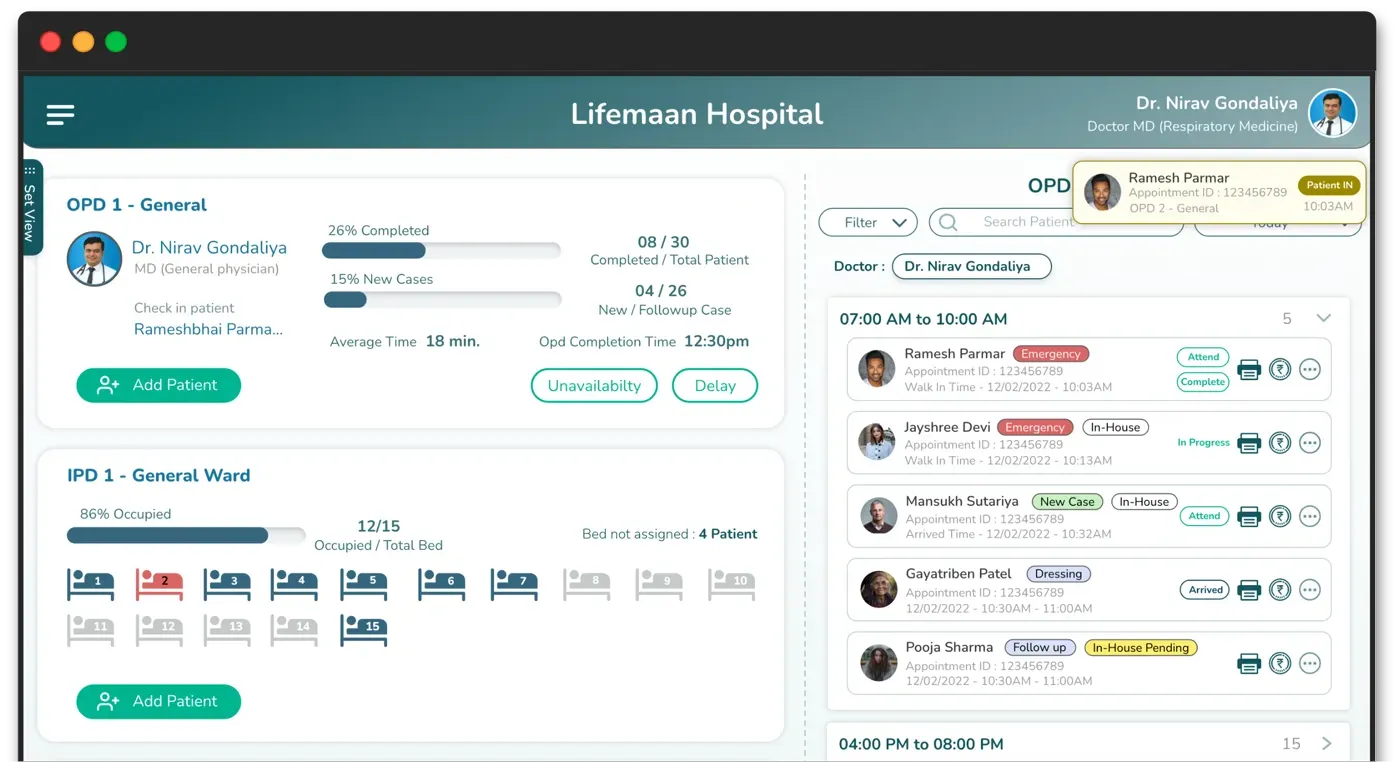
9:40 in the Morning, at Your OPD Door
There are forty people around one desk. Nobody knows who is next. The man who arrived at nine is standing behind someone who walked in ten minutes ago, and he knows it. Two patients are holding appointment slips for 9:30 and cannot understand why that means nothing. The loudest person in the room is being seen first, because arguing works. Your receptionist has not registered anybody in four minutes — she is explaining, apologising, and defending a line she did not create.
Meanwhile the doctor is sitting in an empty consulting room for ninety seconds between patients, because nobody outside knows he is free.
This is not a staffing problem and it is not a discipline problem. It is what happens when the only copy of the queue is in one person's head. A queue management system fixes it by making the order visible to everybody in the room — so the patient stops asking, the receptionist stops defending, and the doctor stops waiting.
Order Your OPD Queue the Way You Run It
Most OPD frustration comes from a queue nobody is really managing — walk-ins and booked patients competing for the same slot, and the front desk calling names by hand. Lifemaan's smart queue management decides the order for you, the way your OPD actually runs. It is built into the OPD management workflow, so a patient joins the queue at registration.
Walk-in first
Patients are seen in the order they arrive — the classic OPD line, managed for you.
Appointment first
Booked patients get priority at their slot, so advance appointments actually mean something.
AI smart queue
The system balances walk-ins and appointments automatically, keeping the OPD moving.
Across multiple doctors
One queue spanning every doctor on duty, with each patient routed to the right room.
Token at Registration, Number on the Waiting-Room Screen
The mechanism is deliberately simple, because anything complicated fails at 9:40. When the patient is registered they get a token for their doctor's queue. A screen in the waiting area shows the number being seen now and the numbers coming next. That is the whole idea, and it removes most of the crowding on its own — people stop standing at the desk because the information they were standing there to get is on the wall.
What hardware do you actually need?
This is the question that decides whether a queue display ever gets installed, so: any television or monitor that can open a browser. A smart TV works. An older TV with a cheap browser-capable stick works. A spare monitor on a wall bracket works. You point it at the queue display screen and leave it there. There is no proprietary token box to buy, no dedicated controller at the desk, and no per-counter hardware licence — which matters because those costs are usually what turns “we should do this” into “next year”.
The token comes from registration, not a separate machine
Because the token is issued as part of registering the patient, there is no second queue for someone to keep in step with the first. A patient who exists in the system is in the queue. This is the difference between a queue display and a queue system: a display driven by a standalone token dispenser knows a number, while this knows which patient, which doctor, and what they are here for.
What the patient can see, and what they cannot
The screen shows tokens and the doctor or counter they belong to. It does not display patient names, so a waiting room full of strangers is not being shown who is being treated for what. This is a deliberate choice rather than a limitation — the number is enough to tell somebody where they stand.
One Queue Per Doctor, One Per Counter — All at Once
A single-line token system works in a bank. It does not work in a hospital, because a hospital is not one line. At ten in the morning you may have Dr. A in general medicine, Dr. B in orthopaedics, a dressing room, and a billing counter — four independent lines running simultaneously, each moving at a different speed.
Lifemaan runs those as parallel queues. Each consultant has their own sequence, each counter has its own, and the waiting-room screen shows them side by side. A patient waiting for orthopaedics is not stuck behind general medicine's backlog, and the orthopaedic patient who also needs a dressing joins that second queue without going back to reception to be re-registered.
Per-consultant sequences
Every doctor on duty has an independent queue. Adding a visiting consultant for an afternoon session does not disturb anyone else's line.
Counters as their own queues
Billing, dressing, injection room and sample collection each hold a queue, so the patient sent for a dressing is in a real line rather than hovering at a door.
One patient, several queues
A patient can be in the orthopaedic queue and then the billing queue on the same visit, carrying the same registration through both.
Department-wise view for the desk
Reception sees every queue at once and can tell at a glance which consultant is running behind — which is the information needed to manage the room.
Appointments and Walk-ins in One Line
Here is the problem nobody solves well. A patient books an 11:00 appointment. At 11:00 there are twelve walk-ins already waiting, some since 9:30. If you honour the appointment strictly, twelve people who have waited ninety minutes watch someone walk past them, and your receptionist absorbs that. If you ignore the appointment, booking one was pointless and that patient will not book again.
Lifemaan does not pretend there is a magic answer. What it does is put both kinds of patient in one ordered queue and let you choose the rule in advance, so the decision is a policy rather than an argument at the desk:
Walk-in first
Strict arrival order. Everyone is treated the same and nobody jumps, which suits a high-volume general OPD where most patients do not book at all. The cost is that an appointment buys the patient nothing but a place in the same line.
Appointment first
A booked patient is placed at their slot and is seen next once the current consultation ends. This is what specialist and post-operative clinics generally want, because those patients have often travelled and the slot was given for a clinical reason.
Smart queue
The system balances the two — honouring a booked slot without letting a long-waiting walk-in be pushed indefinitely down the line. This is the mode most multi-doctor hospitals settle on, because it protects the appointment without producing the scene the strict version causes.
The important part is not which mode you pick — it is that the rule is set once and applied by the system, so the order on the screen is not something your receptionist has to defend as a personal decision. When a patient asks why somebody went ahead of them, the answer is the hospital's stated policy, visible on the wall, rather than a judgement made at the desk under pressure.
What the Front Desk Sees
The queue screen at reception is a working tool, not a monitor. It is the same screen registration happens on, which is the only way it actually gets used during a busy morning.
Calling the next patient
When a consultation ends, the next token is called and the waiting-room screen updates. The doctor is not sending someone out to fetch the next patient, and there is no gap where the room sits empty because nobody outside knew.
Marking a no-show without losing them
A token called twice with nobody responding is marked as absent and the queue moves on. If the patient reappears twenty minutes later — stepped out for tea, was in the pharmacy queue — they can be brought back in rather than being sent to register again. This small thing is most of what stops arguments at the desk.
Re-ordering when a doctor runs late
Consultants get held up — an emergency, a long case, a delayed arrival. Reception can move a queue to another consultant on duty, or reorder within it where there is a clinical reason. Because the change happens in the system, the waiting-room screen reflects it immediately and the room finds out from the wall rather than from a rumour.
Where the day went
Afterwards you can see footfall through the day and per consultant. This is what tells you whether the 9-to-11 crush is real or just felt that way, and whether adding a second morning consultant would fix it. Most owners are mildly surprised the first time they see their own OPD distribution.
The queue is part of the wider OPD management workflow — registration, consultation, prescription and billing — so the patient in the queue is the same record the doctor and the billing counter are working from.
Built Into OPD — Not a Separate System
A standalone queue tool is one more system to maintain. Because Lifemaan's queue shares the OPD and appointment record, walk-ins and booked patients sit in one ordered queue, and front-desk staff manage it from the same screen they already use. Explore the OPD management feature and the complete hospital management system it is part of.
Manual Queue vs Lifemaan Queue Management
What changes at the front desk when the system decides the queue order.
| Feature | LWith Lifemaan | Manual Queue |
|---|---|---|
| Queue order | Walk-in first, appointment first, or AI smart queue | First-come crowding, names called by hand |
| Walk-ins + appointments | Both kept in one ordered queue | Walk-ins and bookings clash for the same slot |
| Multiple doctors | One queue across all doctors on duty | Manual coordination across rooms |
| Front-desk effort | The system manages the order | Staff juggle the line by hand |
| Reporting | Footfall and OPD flow visibility | No data |
Queue order
Walk-in first, appointment first, or AI smart queue
First-come crowding, names called by hand
Walk-ins + appointments
Both kept in one ordered queue
Walk-ins and bookings clash for the same slot
Multiple doctors
One queue across all doctors on duty
Manual coordination across rooms
Front-desk effort
The system manages the order
Staff juggle the line by hand
Reporting
Footfall and OPD flow visibility
No data
Frequently Asked Questions
See Lifemaan in Action
15-minute personalized walkthrough. We show you exactly how it works for your practice.
Or reach us directly: +91 90237 53539 · WhatsApp