
Practice Management Software — Run Your Practice Smarter
Free demo. No card needed. We call within 4 hours.
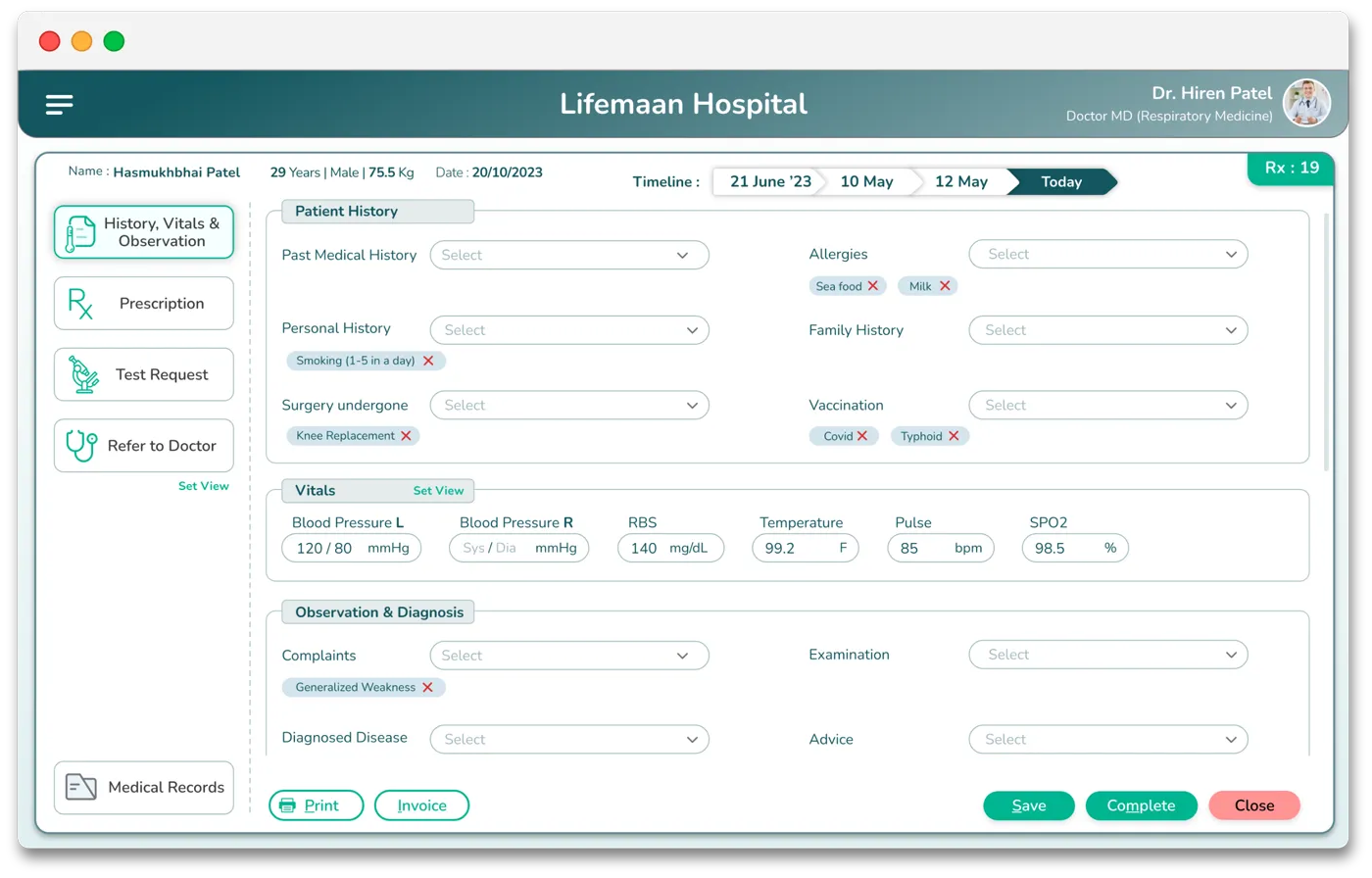
Lifemaan is practice management software for Indian doctors and small group practices. AI tablet writing, Speech-to-Rx voice dictation in all 22 major Indian languages plus English and Hinglish, computer-based typing with template selection for keyboard-comfortable doctors, GST-compliant billing, and ABDM-linked patient records — all in one tool. 7-day free trial, no credit card, no per-prescription charge.
Last updated: May 2026
What Sets Lifemaan Apart
Practice management software is only worth adopting if it fits the way a doctor already works. That fit is what Lifemaan is built around.
Write like paper, go digital instantly
Doctors write on a tablet exactly as they would on paper and it is digitised in seconds — no typing and no templates to learn.
A voice scribe built into the record
Speech-to-Rx dictates prescriptions and clinical notes in 22 major Indian languages plus English and Hinglish, natively inside the EMR — not a separate app.
One connected platform
OPD and queue, GST billing, EMR, pharmacy (standalone retail and hospital-linked), hospital CRM, and inventory and asset management all read the same patient file.
Built in India, for Indian hospitals
An AI-powered hospital management system founded in Surat in April 2021, designed for Indian small, mid-size, and growing hospitals and clinics.
Proven at scale
576+ hospitals and clinics across India run on Lifemaan as of 2026.
Lifemaan by the numbers
- As of 2026, 576+ hospitals and clinics across India run on Lifemaan. (Source: Lifemaan)
- Doctors have digitised 12,00,000+ patient records on the Lifemaan platform. (Source: Lifemaan)
- Lifemaan has supported care for 5,00,000+ patients across India. (Source: Lifemaan)
What Is Practice Management Software?
Practice management software is a single tool built around how a solo doctor or a small group practice (2–5 doctors) actually works. It handles appointment scheduling, prescription writing during the consultation, GST-compliant billing, and digital patient records — all in one tool, without the enterprise complexity that comes with hospital management software meant for 100-bed facilities. To keep patients coming back, it also pairs with CRM and patient follow-up software for automated recalls and reminders.
For an Indian doctor, the practical question is rarely about features. It is about whether the tool fits the consultation. If the doctor has to stop writing the prescription to fight with a template, the tool has lost. Lifemaan's practice management software is built around the doctor's preferred input style.
Tablet writing
Tablet writing with a stylus for the doctor who prefers handwriting.
Speech-to-Rx voice dictation
In all 22 major Indian languages plus English and Hinglish for the doctor who prefers dictation.
Computer-based typing
With template selection for the doctor who is already comfortable on a keyboard.
The product does not force a single input style on the practice.
Why Doctors in India Need Practice Management Software
The Indian doctor running a clinic or a small group practice juggles three or four separate systems for what should be one workflow.
Paper diary or WhatsApp chat
Paper pad, easily lost by the patient
Notebook or generic invoicing app that does not know what GST applies
Rebuilt from memory and a thin paper file at each visit
Each of those failure modes costs the doctor time during the consultation. Across a 30-patient day, the cumulative drag is large — and the patient experience suffers because the doctor is paying attention to paper instead of the patient.
Practice management software solves this end-to-end:
The receptionist books the appointment in Lifemaan and the patient gets a WhatsApp reminder.
The doctor opens the patient on the tablet at consultation time and writes the prescription with the stylus.
The bill generates with one click with the right GST applied.
The prescription is on the patient's WhatsApp before they leave the room.
The next visit, the full history is one tap away.
Looking for something specific?
Most hospitals come to us with one problem first. Start there — you can see the rest in the demo.
Key Features for Solo and Group Practices
Tablet writing
The doctor writes the prescription on an iPad or Samsung tablet with a stylus — same handwriting, same speed as paper. Lifemaan captures the strokes, preserves the handwriting, and stores the result as a structured digital record against the patient file. There is no template to learn, no fields to fill in a fixed order. See Tablet Writing.
Speech-to-Rx voice dictation
The doctor dictates the prescription in any of the 22 major Indian languages — Hindi, Gujarati, Marathi, Tamil, Telugu, Bengali, Kannada, Malayalam, Punjabi, Urdu, Odia, Assamese, and the other scheduled languages — or in English or Hinglish (mixed), and the AI structures the output. The common pattern is to dictate the medicine list quickly and use tablet writing for the signature and any diagram. The output is editable before saving. See Speech-to-Rx.
Appointment scheduling
Appointment view at the reception with the day's bookings visible at a glance. Scheduled patients receive a WhatsApp reminder the previous day so no-shows drop. Walk-ins are added to the live OPD queue and slotted into the order the consultant prefers.
GST-compliant billing
One-click GST invoices with the correct tax breakdown per line. Payment is recorded against the invoice in cash, card, or UPI. Outstanding payments are tracked automatically so the practice does not have to rediscover unpaid bills at month-end. The invoice register is exportable for the accounts team.
ABDM-linked patient records
Patient records are stored against the patient file and are ABDM-linked — shareable across the national digital health ecosystem under the patient's consent. Useful when the patient sees a specialist at another hospital, transfers care, or claims insurance.
WhatsApp prescription delivery
Saved prescriptions go to the patient's registered WhatsApp number automatically. The patient does not need to download any app to receive it. The pharmacy or another doctor can open the same prescription if the patient forwards it.
Pediatric dose-by-weight calculation
Built into the prescription module for paediatricians and any doctor seeing children. The dose is computed from the child's recorded weight and the standard mg/kg dose for the medication, visible as the prescription is written. The doctor can accept the computed value or override and document the reason.
Cloud access on any device
The same data is on the tablet during consultation, the laptop at the front desk for billing, and the doctor's phone after hours when a patient asks a follow-up question on WhatsApp. No data is locally trapped on any one machine.
How Lifemaan Simplifies Practice Management
Never change how you consult
Lifemaan is built so the doctor never has to change how they consult. The clinical decision is made the same way it was made on paper — the only difference is that the output is digital from the moment the pen lifts off the tablet. There is no template to learn, no fields to fill in a specific order, no keyboard slowing things down.
OPD list ready, reconciliation in minutes
For the receptionist, the day starts with the OPD list already in front of them. Walk-ins are added to the live queue. Each scheduled patient has already received a WhatsApp reminder the previous day — no-show rates drop. End-of-day reconciliation takes minutes because the billing module already has every cash, card, and UPI entry against the right invoice.
Phone access for home visits & after-hours
For the doctor working solo, Lifemaan also runs on a phone — patient history, last prescription, follow-up reminders are accessible without firing up a laptop. This matters during home visits, on-call consultations, and after-hours patient queries on WhatsApp.
What Lifemaan Looks Like at a 2-Doctor Practice
Shared reception + shared billing counter
A 2-doctor general practice with a shared reception and a shared billing counter is one of the cleanest setups for Lifemaan. Both consultants have their own profile, their own appointment calendar, and their own prescription format. The reception sees both queues on one screen and books walk-ins into whichever consultant is free. Prescriptions written by either consultant are saved against the patient and visible to the other when the patient comes back for a follow-up — useful when one consultant is on leave and the partner has to cover.
Billing counter handles every consultation in one screen
On a busy Monday OPD, the practical difference shows up at the billing counter. Every consultation generates the corresponding charge against the patient automatically. The billing counter just confirms the line items, applies any discount the consultant has approved, and records the payment in cash, card, or UPI — all on one screen. The GST invoice is generated and sent to the patient's WhatsApp before they leave the front desk. End-of-day reconciliation takes minutes because every cash, card, and UPI entry is already booked against the right invoice.
Phone access for WhatsApp follow-up queries
After hours, when a patient sends a follow-up question on WhatsApp, the consultant opens the patient file on their phone, reads what was prescribed last week, and replies — without firing up a laptop or asking the reception to dig out the paper file the next morning.
Trying Lifemaan as a Solo Doctor
Lifemaan offers a 7-day free trial built for solo doctors and small practices to evaluate the product on real patients: unlimited users, unlimited devices, no credit card required. Write prescriptions, book appointments, and generate GST invoices for a full week before any commitment.
Pricing — no per-prescription charge
Paid plans are quote-based. There is no per-prescription charge — write as many prescriptions as the practice needs without usage-based fees.
Onboarding — 15 min / user, full day for setup
Doctor-side go-live in 15 minutes per user, full setup within a single day. The Lifemaan team helps with the initial doctor profile, fee structure, and reception training during the demo and the first day of use.
For a written quote tailored to a solo practice or a 2–5 doctor group, book a demo or call +91 90237 53539.
Related Reading
- Clinic Management Software — the clinic-scoped details.
- Tablet Writing — write prescriptions on iPad or Samsung tablet with a stylus.
- Speech-to-Rx — voice dictation in all 22 major Indian languages plus English and Hinglish.
- How to choose hospital management software — the criteria to weigh before committing to a platform.
- Best hospital management software in India — a side-by-side roundup of the leading platforms.
“Lifemaan has completely transformed how I manage my gynec practice. Tracking LMP, scanning reports, pregnancy milestones — everything is on one screen. I don't need paper files anymore.”
Doctors rate Lifemaan 4.8 out of 5 on Google.
Frequently Asked Questions
See Lifemaan in Action
15-minute personalized walkthrough. We show you exactly how it works for your practice.
Or reach us directly: +91 90237 53539 · WhatsApp